9 Best Motion Sensor Alarms for the Home (October 2026)
The best home motion sensor alarms include the Ring Motion Detector for Ring users, the SimpliSafe Motion Sensor for SimpliSafe Gen 3, and the eufy Motion Sensor E20 for eufy HomeBase owners.
On this page (7 sections)
- Which motion sensor alarm fits your home?
- How we compared the best motion sensor alarms
- How do you choose a motion sensor alarm?
- How should you set up an indoor motion sensor?
- What mistakes should you avoid with a motion sensor alarm?
- Are standalone motion sensor alarms enough for home security?
- Which best motion sensor alarm should you choose?
The best motion sensor alarm depends on whether you need a system sensor or a standalone siren. Ring and SimpliSafe make sense for their compatible systems, while TECKNET, CPVAN and other standalone picks add a local alarm or chime to a specific room.
A motion sensor works best when it watches a clear path that matters, such as a room entrance or a hallway leading to private areas. It is one layer of a home alarm, so consider what should happen after motion is detected: a phone alert, a system alarm, a siren nearby or a quiet chime.
If you are building a complete setup, begin with our guide to DIY alarm systems and how they work. For glass entry points or rooms with pets, read our glass break sensor guide and pet-immune motion sensor picks.
Our picks at a glance
-
1

-
2

-
3

- 4
 Check it
TECKNET Indoor Motion Sensor Alarm
Best for adjustable local alerts - 5
 Check it
CPVAN Indoor Motion Sensor Alarm
Best for a garage or shed - 6
 Check it
METAK Wireless Motion Sensor Alarm
Best for a door chime - 7
 Check it
AMHEY Battery Motion Sensor Alarm
Best for remote arming - 8
 Best for a portable alarmCheck it
 - 9
 Check it
BESTOONE Indoor Motion Sensor Alarm
Best for several alert points
Which motion sensor alarm fits your home?
The best motion sensor alarm for your home depends first on your existing equipment, then on whether you need an app alert or a sound at the sensor. These picks include system-linked sensors for Ring, SimpliSafe and eufy, plus standalone alarms and chimes for specific rooms.
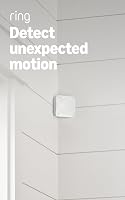
Ring Motion Detector: Best for Ring users
- 90° field of view
- 9.1 m stated range
- Settings designed to reduce alerts from pets under 50 lb
- Amazon Sidewalk required
A room sensor with pet-friendly settings and no base station requirement. Amazon Sidewalk is required, and coverage may vary.
Pros
- No base station required
- 90° field of view
- Pet-friendly settings
Cons
- Requires Amazon Sidewalk
- Coverage may vary
Ring is the right fit if your home already uses compatible Ring equipment and you want a room sensor without a separate base station. It covers a 90° field of view with a stated 9.1 m range, and settings can reduce alerts from pets under 50 lb.
Amazon Sidewalk is required, and coverage may vary. Ring also offers optional 24/7 Pro Monitoring with a compatible subscription, but this sensor does not require a multi-year contract.
Choose it for a room where system alerts are more useful than a siren built into the sensor. Skip it if Amazon Sidewalk is unavailable or you want an independent alarm that sounds locally without relying on the Ring setup.
For help choosing the rest of a system, see the best home alarms you can set up yourself.
SimpliSafe Motion Sensor: Best for SimpliSafe Gen 3
- 90° field of view
- 35 ft stated range
- Designed to reduce alerts from pets around 50 lb
- Peel-and-stick or hardware installation
This add-on sensor is made for SimpliSafe Gen 3 and can sit on a shelf or mount in a corner. It is a good fit when you already use that system.
Pros
- Designed for SimpliSafe Gen 3
- Corner placement for room coverage
- Shelf or wall installation
Cons
- Requires a compatible SimpliSafe system
- Not a standalone siren
The SimpliSafe sensor is for homes with a Gen 3 Home Security System. Its wide view and stated 35 ft range suit a large room when you can place the sensor in a corner with a clear line of sight.
You can put it on a shelf or mount it with the included hardware, then follow the app setup steps. The pet-friendly design is intended to reduce false alarms from pets around 50 lb.
Choose it as an add-on to a Gen 3 system, not as a self-contained siren. If the room also has pets, our guide to where to put a SimpliSafe motion sensor covers placement considerations.
eufy Motion Sensor E20: Best for eufy HomeBase owners
- Requires compatible eufy HomeBase
- 90° field of view
- Detects motion up to 26 ft at stated mounting height
- Pet-friendly detection up to 80 lb
The E20 works with specified eufy HomeBase models and includes a CR123A battery. Its placement and HomeBase requirements matter before you choose it.
Pros
- Pet-friendly detection up to 80 lb
- Mounts on walls or corners
- Long stated battery life
Cons
- Requires a compatible HomeBase
- Detection range depends on mounting height
The eufy Motion Sensor E20 is a good choice if you already have a compatible HomeBase and want pet-friendly motion coverage. It works with HomeBase Mini, HomeBase 2, HomeBase 3 and HomeBase Pro at the stated software versions, so confirm the model and update level before buying.
At a mounting height of 6–7.5 ft, its 90° field of view covers a stated range of up to 26 ft. eufy says the included CR123A battery can last up to 5 years under normal conditions, and its pet detection is designed for animals up to 80 lb.
Mount it on a wall or in a corner, keeping it away from direct light, heat sources, windows and vents. Skip this sensor if you do not own a compatible HomeBase or need an alarm that works independently of a hub.
For more options around larger pets, compare it with our pet-immune motion sensor guide.
TECKNET Indoor Motion Sensor Alarm: Best for adjustable local alerts
- Alarm and doorbell modes
- 80, 100 or 125 dB volume settings
- 16–26 ft stated detection range
- AAA or USB-C power
This indoor unit pairs a motion sensor with a local siren, strobe and remote. Its selectable modes and volume levels suit spaces where you want alerts without an app.
Pros
- Three volume levels
- Alarm and chime modes
- USB-C power option
Cons
- Designed primarily for indoor use
- USB-C powers the unit but does not recharge batteries
TECKNET is a strong fit for an indoor room where you want a local siren, strobe or visitor chime. Choose alarm mode for a security alert or doorbell mode for a less urgent notification.
The 120° sensor has a stated 16–26 ft detection range. You can choose 80, 100 or 125 dB, and the included remote works up to 328 ft in open areas.
It can run on AAA batteries or USB-C power. USB-C keeps the unit powered but does not recharge the batteries, so decide which power arrangement suits the room before mounting it.
This makes sense for a hallway, garage or storage room where you want an audible warning without an app. Skip it if you need outdoor protection or phone notifications.
CPVAN Indoor Motion Sensor Alarm: Best for a garage or shed
- 125 dB stated siren
- Alarm and chime modes
- 40 ft maximum stated detection range
- Remote control
A portable indoor alarm for a garage, shed or other space where a local sound matters. PIR sensing does not detect movement through walls, windows or glass doors.
Pros
- No Wi-Fi or hub required
- Remote control included
- Can sit on a shelf or mount
Cons
- Not waterproof
- PIR sensing does not work through glass or walls
CPVAN suits an indoor garage, shed or room where a loud alarm and remote control matter more than app access. Its alarm and chime modes work without Wi-Fi or a hub.
The stated detection range reaches 40 ft, with best performance typically within 10–26 ft. The 125 dB siren is loud, so choose a location where an alarm will be useful rather than disruptive.
PIR sensing needs a direct view of the area and does not detect movement through walls, windows or glass doors. The unit is not waterproof, so skip it for an exposed outdoor location.
If you need to detect an opening at an entry point, compare this approach with door alarms for home security.
METAK Wireless Motion Sensor Alarm: Best for a door chime
- 32 selectable ringtones
- Five volume levels
- 110° detection angle
- Plug-in receiver
The motion sensor sends alerts to a plug-in receiver with selectable ringtones and volume levels. It can work as a doorway chime as well as a motion alert.
Pros
- Many ringtone choices
- Adjustable receiver volume
- Supports up to 20 sensors per receiver
Cons
- Receiver needs an outlet
- No system compatibility details for major alarm platforms
METAK works best as a motion-triggered chime for a doorway, hallway or shop entrance. Its plug-in receiver offers 32 ringtone choices and five volume levels, up to a stated 110 dB.
The detector has a 110° angle and a stated 26 ft detection diameter. A single receiver can support up to 20 sensors, which makes it useful if you want alerts at multiple approach points.
The receiver needs an outlet, so plan where you want to hear the chime before mounting the sensor. Choose another model if you want a loud standalone siren or a sensor that joins a major alarm platform.
AMHEY Battery Motion Sensor Alarm: Best for remote arming
- 125 dB stated siren and strobe
- Alarm and doorbell modes
- 16–26 ft stated detection range
- Remote control included
The self-contained alarm has a remote, two alert modes and two volume levels. It suits a small area where you want a local sound rather than an app-connected sensor.
Pros
- Remote control included
- Alarm and doorbell modes
- Can use batteries or USB power
Cons
- No Wi-Fi connection
- Placement and power needs vary by use
AMHEY is a practical pick for a small area where you want to arm or disarm a local siren with a remote. It has alarm and doorbell modes, two volume levels, a strobe and a stated 16–26 ft detection range.
The remote includes a panic button, and the alarm can use AAA batteries or USB power. Tape or screws give you two mounting choices, which helps if you need a temporary indoor setup.
Choose this for a room, storage area or temporary location where a sound is enough. Skip it if you want phone alerts, a system hub or outdoor-rated protection.
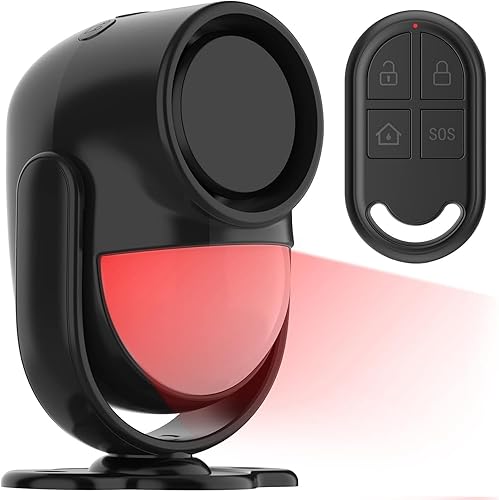
luckydeer Motion Sensor Alarm: Best for a portable alarm
- Alarm and doorbell modes
- Remote with SOS button
- 16–26 ft stated detection range
- AA batteries included
This portable indoor alarm includes a remote and can be mounted with tape or screws. Its alarm and chime modes cover simple alert needs in a room or storage area.
Pros
- Remote includes an SOS button
- Tape or screw mounting
- Alarm and chime modes
Cons
- Indoor use is the stated focus
- No app alerts in the core product details
The luckydeer alarm is a portable indoor option for a room, shed or van where a remote and simple local alert are enough. Use alarm mode for a siren or doorbell mode for a gentler chime.
Its stated detection range is 16–26 ft, and the included remote has an SOS button. You can attach the unit with tape or screws, and it runs on three included AA batteries.
This is a straightforward choice for a space you want to arm without app setup. Skip it if you need notifications when away from home or protection designed for outdoor exposure.
BESTOONE Indoor Motion Sensor Alarm: Best for several alert points
- Four motion detectors and two alarm units
- 38 ringtone options
- Three volume levels plus silent LED mode
- 300 ft stated signal distance
The multi-piece set can cover several spots and offers both sound and silent LED alerts. Keep the sensors clear of obstructions and avoid rain because they are not waterproof.
Pros
- Multiple detectors and alarm units
- Silent LED alert option
- Several ringtone choices
Cons
- AAA batteries are not included
- Not waterproof
BESTOONE is for covering several alert points with one set. It includes four motion detectors and two alarm units, with 38 ringtone choices, three volume levels and a silent LED mode.
The stated detection distance is about 20 ft, and the wireless signal can travel up to 300 ft to the receiver. Sensors need AAA batteries, which are not included.
Keep each detector clear of obstructions, and avoid locations where wind can trigger it or rain can reach it. The set is not waterproof, so choose it for protected indoor areas rather than exposed paths.
How we compared the best motion sensor alarms
We compared each motion sensor alarm by system compatibility, stated coverage, alert type, power and placement limits. The scores reflect how well each option fits the needs of someone looking for room-level motion alerts, a local siren or a visitor chime.
A system-linked sensor makes the most sense when you already own the matching equipment. Standalone units earn their place when a local sound or chime solves the problem without adding an app or hub.
How do you choose a motion sensor alarm?
Choose by connection, alert, room coverage and power. These four checks will narrow the choices quickly and help prevent buying a sensor that cannot work with your setup.
Does the motion sensor alarm work with your system?
Ring works over Amazon Sidewalk, SimpliSafe is designed for its Gen 3 system, and eufy E20 needs a compatible HomeBase at the required software version. Confirm the equipment you have before choosing a sensor, since a familiar brand name alone does not guarantee compatibility.
Standalone alarms take another route. TECKNET, CPVAN, AMHEY and luckydeer use a local sensor and alarm or remote, while METAK sends a motion alert to a plug-in receiver.
What should the sensor alert you to?
A system sensor is useful when you want motion to become part of a broader alarm setup. Standalone sirens suit rooms where someone nearby should hear a warning, and chime units suit entryways where you want to know that a person has arrived.
Decide whether an alert should wake someone, warn a person in another room or quietly signal a visitor. A very loud siren may be excessive in a small home office, while a low-volume chime may not suit a detached garage.
How much coverage does the room need?
Compare the stated angle and range with the room shape, then account for furniture and likely paths through the space. A wide field of view helps cover an open room from one position, but objects can block the sensor’s view.
Do not assume the longest range is always better. A sensor aimed across a room can be less useful than one placed to watch a clear route near a doorway.
Does the power source suit the location?
Battery power avoids needing an outlet near the sensor, but it adds battery checks and eventual replacement. USB or Micro USB power can suit a fixed indoor position, while a plug-in receiver needs an outlet where you can hear it.
The eufy E20 includes a CR123A battery and has a stated life of up to 5 years under normal conditions. For other models, follow their instructions and check the power arrangement before mounting.
How should you set up an indoor motion sensor?
Set up the sensor so it watches the area you need while avoiding common sources of unwanted alerts. Read its instructions first, choose a stable mounting point, and check the view before relying on it.
Where should you mount a motion sensor alarm?
Use the recommended mounting height and direction for the specific model. For the eufy E20, the stated range applies at 6–7.5 ft; eufy also recommends keeping the sensor vertical and above 6 ft.
For the SimpliSafe sensor, a corner can help cover a large room. The TECKNET unit rotates 360° so you can adjust its direction, while the other standalone models can use adhesive, screws, a shelf or a flat surface depending on the model.
What can cause false motion alerts?
Direct light, heat sources, windows and vents can trigger unwanted alerts, according to eufy’s guidance. Keep the sensor away from those conditions where possible, and avoid aiming at moving curtains, fans or areas where pets climb onto furniture.
If you have a pet, place the sensor so it watches the human approach route and not the pet’s usual path. Pet-friendly settings can reduce some alerts, but the stated weight limits do not promise that every animal or room arrangement will be ignored.
How can you confirm the setup works?
After mounting, walk through the monitored area and confirm that the sensor responds where you expect. Then check that the selected alert reaches the right place, whether that is an app, a siren, a remote-controlled unit or a plug-in chime.
Repeat the check after changing furniture, moving the sensor or changing its angle. A clear view can change when a door is left open or a storage item is placed in front of the sensor.
What mistakes should you avoid with a motion sensor alarm?
The most common mistake is buying a sensor that does not match the system or location. Check the connection, weather limits and alert type before installation.
Do not aim a PIR sensor through glass or a wall. CPVAN specifically says its sensor cannot detect motion through windows, glass doors or walls, and several standalone alarms in this guide are designed for indoor use only.
Avoid placing a detector where wind or obstructions can interfere with its view. The BESTOONE instructions advise keeping the detector clear of obstructions and away from rain, while eufy warns against direct light, heat sources, windows and vents.
Do not assume a pet-friendly label prevents every false alert. Follow the model’s height and angle guidance, and adjust the monitored path if a pet regularly crosses the sensor’s view.
Finally, do not treat a local siren as a complete alarm plan if you need alerts while away. A siren can warn people within earshot, but a standalone alarm without app access does not provide the same kind of remote notification as a connected system.
Are standalone motion sensor alarms enough for home security?
A standalone motion sensor alarm can provide a useful local warning, but it may not notify you when you are away. Choose one for a room, garage or shed where a sound or chime is the main goal.
For broader coverage, combine motion detection with entry sensors on doors or windows and a compatible alarm system. A motion sensor watches movement in its field of view, while a contact sensor can alert you when an entry point opens.
For another way to protect a common access point, see our guide to window alarm sensors for home security. If glass is the concern, a glass break sensor serves a different purpose from a motion sensor.
Which best motion sensor alarm should you choose?
Choose Ring if you use compatible Ring equipment and want a room sensor without a separate base station. Choose SimpliSafe for a Gen 3 system, or eufy E20 if you have a compatible HomeBase and want its pet-friendly coverage.
For a local alarm, choose TECKNET for adjustable volume and a strobe, or CPVAN for a remote-controlled siren in an indoor garage or shed. Choose METAK when a motion-triggered chime is the goal, AMHEY for a remote and alarm modes, and luckydeer for a portable indoor alarm.
Choose BESTOONE if you need several detectors and receivers across protected indoor spots. Start with DIY alarm systems and how they work if you are still deciding how motion coverage should fit into a larger home alarm.
Our top 3 picks at a glance
-
1
-
2
-
3
Frequently asked questions
What is the best motion sensor alarm for a home?
The best choice depends on your alarm system and the alert you need. Ring and SimpliSafe sensors fit their respective ecosystems, while standalone models such as TECKNET and CPVAN provide a local siren or chime.
Check compatibility, room coverage and power before choosing.
Can a motion sensor alarm work without Wi-Fi?
Yes. Several standalone alarms here use a sensor and remote or receiver without Wi-Fi, while system-linked sensors need their compatible hub or connection.
Check whether you want only a local sound or alerts through a home security app.
Where should you place an indoor motion sensor?
Place a sensor where it has a clear view of the area you want to monitor, and follow its height and angle guidance. For the eufy E20, the stated detection range applies at a 6–7.5 ft mounting height.
Keep sensors away from direct light, heat sources, windows and vents when those can cause false triggers.
Will a motion sensor detect movement through glass?
PIR sensors generally need a clear view of the area they monitor. CPVAN says its sensor does not detect motion through walls, windows or glass doors.
For glass entry points, consider a dedicated glass break sensor instead.
Do pet-friendly motion sensors ignore every pet?
No. Pet settings are designed around stated size limits and placement conditions, so they cannot promise that every pet will be ignored in every room.
Ring describes settings for pets under 50 lb, while eufy states detection designed for pets up to 80 lb.
Follow the setup guidance and monitor alerts after installation.