10 Best Door Alarms for Home Security (October 2026)
The best door alarms for home security include the SimpliSafe Entry Sensor 4-Pack for SimpliSafe owners, the UltraPro 6-Pack Door and Window Alarm for multi-point coverage, and the Philips 4-Pack Door and Window Alarm for simple local alerts.
On this page (6 sections)
The best door alarms for home give you a clear alert when someone opens a door or window. SimpliSafe is the right fit for homes with its Gen 3 system, UltraPro covers several openings with local alarms, and YoLink or Tapo can send hub-based app alerts.
A door alarm can announce an opening or sound a local alarm. It doesn't replace a complete security plan, but it can make a door, window, cabinet or other opening easier to monitor.
Start by deciding whether you want a siren at the opening, a chime in another room, or a phone notification. Then check how many entry points need sensors and whether you already have a compatible security hub.
If you want to compare system components first, read our guide to DIY alarm systems and what to buy. For sensor types and placement basics, see door alarm sensors and where to place them.
Our picks at a glance
-
1

-
2
 Best for multi-point coverage
UltraPro 6-Pack Door and Window Alarm
8.3/10 our score
See it on Amazon -
3
- 4
 Best for quiet entry noticesCheck it
 - 5
 Check it
YoLink Door and Window Sensor Kit
Best for remote outbuildings - 6
 Best for tone choicesCheck it
 - 7
 Best for Tapo automationCheck it
 - 8
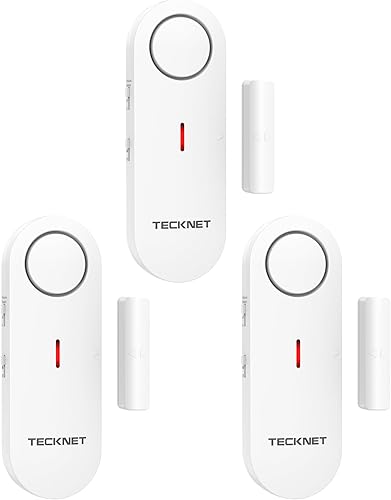 Check it
TECKNET 2-in-1 Door and Window Alarm
Best for travel security - 9
 Best for Wyze system usersCheck it
 - 10
 Check it
METAK Wireless Door Open Alarm
Best for one entry point
How we chose the best door alarms for home
The best door alarms for home match the alert you want with the system and entry points you have. We compared system requirements, alert choices, pack size, installation approach and the practical details that affect setup.
We favored options with a clear role, such as local alarms that work without a hub or sensors that add useful notifications to a compatible system. A hub can add phone alerts and automation, but it also brings another device and setup steps.
Each score reflects how well the features fit this guide's shopping needs. The highest score goes to a useful add-on for an existing system, while the standalone and receiver-based picks serve households that want alerts without building a full alarm network.
Before you choose, check whether you need a standalone alarm, a receiver, a hub or a complete security kit. Those requirements matter more than a long feature list if the sensor won't work with what you own.
| Product | Best for | Pack size | System | Alerts | Our score |
|---|---|---|---|---|---|
| SimpliSafe Entry Sensor 4-Pack | SimpliSafe owners | 4 entry sensors | SimpliSafe Gen 3 required | Base Station chime or discreet phone notification | 8.4 |
| UltraPro 6-Pack Door and Window Alarm | multi-point coverage | 6 alarms | 8.3 | ||
| Philips 4-Pack Door and Window Alarm | simple local alerts | 4 alarms | 8.0 | ||
| SECRUI Door Open Chime Alarm | quiet entry notices | 7.9 | |||
| YoLink Door and Window Sensor Kit | remote outbuildings | App notifications and door-left-open reminder | 7.8 | ||
| Satisure Door Chime Alarm | tone choices | 7.7 | |||
| Tapo Door Sensor Starter Kit | Tapo automation | App notifications and customizable alarm | 7.6 | ||
| TECKNET 2-in-1 Door and Window Alarm | travel security | 3 alarms | 7.5 | ||
| Wyze Entry Sensor 3-Pack | Wyze system users | 3 entry sensors | Wyze Home Security System Core Kit required | Open, closed and left-open alerts | 7.4 |
| METAK Wireless Door Open Alarm | one entry point | 7.3 |
Which door alarm should you choose?
Choose SimpliSafe for a compatible Gen 3 system, UltraPro for several standalone alarms, or Tapo and YoLink for hub-based alerts. The other picks suit homes that want a receiver chime, portable local alarms or added sensors for an existing system.
SimpliSafe Entry Sensor 4-Pack: Best for SimpliSafe owners
SimpliSafe Entry Sensor 4-Pack: Best for SimpliSafe owners
- 4 contact sensors
- Compatible with SimpliSafe Gen 3
- Chime or discreet phone alerts
- Peel-and-stick or hardware mounting
A direct fit for an existing SimpliSafe Gen 3 setup, with chime and discreet alert options by sensor.
Pros
- Works with doors, windows and cabinets
- Secret Alerts can notify your phone without sounding the alarm
- Peel-and-stick or permanent mounting
Cons
- Requires a compatible SimpliSafe Gen 3 system
- Not a standalone alarm
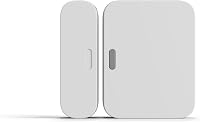
The SimpliSafe Entry Sensor 4-Pack is the clearest choice if your home already uses the SimpliSafe Gen 3 system. Its sensors work on doors, windows, cabinets and other openings, and the Base Station can chime or identify which sensor opened.
You can set a sensor to send a discreet phone notification without sounding the alarm. That can be useful for a cabinet or interior door where you want awareness without an audible alert.
Installation can be peel and stick or use the included hardware. Choose this pack if you want entry sensors that join an existing SimpliSafe setup, and skip it if you need a standalone alarm.
For more on the system requirement, read our SimpliSafe Entry Sensor guide.
UltraPro 6-Pack: Best for multi-point coverage
UltraPro 6-Pack Door and Window Alarm: Best for multi-point coverage
- 6 indoor alarms
- Selectable siren or chime
- 120 dB alarm
- Double-sided tape mounting
Six independent alarms cover several entry points, with a side switch for choosing chime or alarm mode.
Pros
- Broad coverage from one pack
- No app or monthly fee required
- Low-battery indicator
Cons
- Indoor installation only
- Each alarm needs four LR44 batteries
UltraPro is a practical fit for households that want several local alarms without an app or monthly fee. The six alarms install indoors with double-sided tape, and a side switch selects off, chime or alarm mode.
Each unit has a stated 120 dB alarm and a low-battery indicator. That combination suits doors or windows where you want a direct alert at the opening, rather than remote monitoring through a hub.
Choose UltraPro when you have several entry points to cover at once. Skip it if you need phone alerts or outdoor installation, since these alarms are intended for indoor use.
The product data conflicts on which batteries are included, so check the package before planning replacements. If windows are your main concern, our guide to window alarm sensors compares options for those openings.
Philips 4-Pack: Best for simple local alerts
Philips 4-Pack Door and Window Alarm: Best for simple local alerts
- 4 magnetic contact alarms
- Selectable chime or 120 dB alarm
- Double-sided tape mounting
- Battery test button and low-battery LED
Four adhesive-mounted alarms offer a straightforward choice between a chime and a loud local alarm.
Pros
- Four alarms for multiple openings
- Side switch selects alert mode
- Battery test button
Cons
- No app notifications described
- Each alarm uses four LR44 batteries
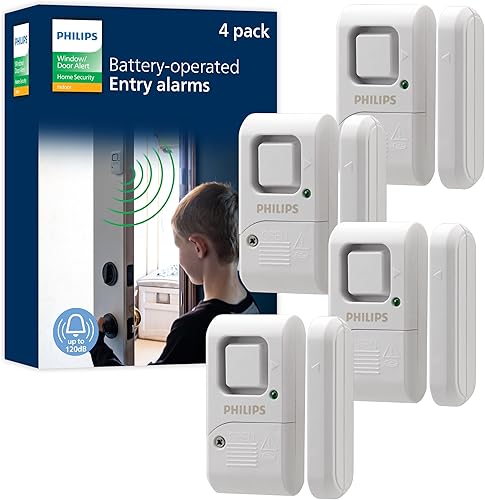
Philips offers four magnetic alarms with a chime or 120 dB alarm mode. The side switch makes it easy to choose an alert that suits each door or window.
Double-sided tape keeps installation simple, and a battery test button plus low-battery LED help you check the units. This is a straightforward alternative when you want more than one local alarm but don't need a hub or app.
Choose Philips for basic audible alerts at several openings. Skip it if phone notifications are essential, since the described alerts are local rather than app-based.
SECRUI Door Open Chime: Best for quiet entry notices
SECRUI Door Open Chime Alarm: Best for quiet entry notices
- 58 chimes
- 5 volume levels, including mute
- LED indicator
- Sensor and plug-in receiver
A receiver-based chime provides many tone and volume choices, including a visual alert when muted.
Pros
- Many chime choices
- Sensor and receiver arrive pre-paired
- Can add sensors for distinct alerts
Cons
- Receiver needs an outlet
- Maximum range is unclear
SECRUI suits homes that want a receiver with many chime choices and adjustable volume. It arrives with one sensor and a plug-in receiver, already paired, and its LED can still show an alert when the sound is muted.
The product details give two different maximum range figures, so the usable distance is unclear. Its 58 chimes, five volume levels and LED indicator still offer several ways to receive an alert.
Choose this kind of receiver chime for a front door, workshop entry or a room where you need to notice an opening. Skip it if you don't have a convenient outlet for the receiver or want app-based system integration.
YoLink Sensor Kit: Best for remote outbuildings
YoLink Door and Window Sensor Kit: Best for remote outbuildings
- 1 hub and 4 sensors
- App alerts
- Door-left-open reminders
- LoRa open-air range up to 2,034 ft
The kit pairs four sensors with a hub for app alerts and door-left-open reminders, with a long-range wireless connection.
Pros
- Hub and four sensors included
- Sensors have preinstalled batteries
- Device-to-device pairing can work without internet or power
Cons
- Requires the hub and a phone
- Hub needs Ethernet or 2.4 GHz Wi-Fi for internet features
YoLink is the pick for buyers who want four sensors, a hub and app notifications in one kit. The hub connects to the sensors, and the system can send alerts or remind you when a door has been left open too long.
The sensors use LoRa, with an open-air range stated as up to 2,034 ft. Internet-based features require the hub to connect by Ethernet or 2.4 GHz Wi-Fi, and you'll need an Android or Apple phone for the app.
YoLink says paired devices can carry out their actions even if the internet and power are out. Choose this kit if you want to build beyond a basic local alarm; skip it if you don't want a hub or phone-based setup.
For a related planning issue, read our home alarm battery backup guide.
Satisure Door Chime: Best for tone choices
Satisure Door Chime Alarm: Best for tone choices
- 58 melodies
- 5 volume levels and silent LED mode
- Up to 600 ft stated range
- Pre-paired receiver and sensor
A plug-in receiver and pre-paired sensor make this a simple choice for audible or visual entry alerts.
Pros
- Many tone choices
- Silent LED alert mode
- Receiver remembers selected tune when unplugged
Cons
- One sensor and one receiver included
- Needs an outlet for the receiver
Satisure is a good match for a door where you want a plug-in chime with many tones and a silent visual alert. Its receiver and sensor are pre-paired, and you can choose from 58 melodies and five volume levels.
The stated range is up to 600 ft, and the system can pair with additional sensors or receivers. Signal reach can vary with the home layout and walls, so place the receiver where you can hear or see it.
Choose Satisure when an adjustable chime is more useful than a siren or app notification. Skip it if you need several sensors in the box, since this set includes one sensor and one receiver.
Tapo Starter Kit: Best for Tapo automation
Tapo Door Sensor Starter Kit: Best for Tapo automation
- 3 contact sensors and 1 hub
- App notifications and activity history
- Customizable 90 dB alarm
- Matter-compatible
Three sensors and a hub connect entry alerts with the Tapo app and compatible smart home devices.
Pros
- Hub and three sensors included
- Activity history in the app
- Can pair with Tapo cameras and smart lights
Cons
- Sensors require the Tapo Hub
- 2.4 GHz Wi-Fi is required
Tapo suits a home where app notifications and smart home automation matter. The kit includes three contact sensors and a hub with a chime, and the app can show activity history and real-time opening alerts.
The hub is required for the sensors to work, and 2.4 GHz Wi-Fi is required. Tapo says the sensors can connect with compatible smart home platforms through Matter and pair with Tapo cameras and lights for additional actions.
Choose Tapo if you want entry alerts connected to the Tapo app and compatible routines. Skip it if you don't want a hub or if you need sensors that pair with a different alarm system.
TECKNET 2-in-1 Alarm: Best for travel security
TECKNET 2-in-1 Door and Window Alarm: Best for travel security
- 3 alarms
- Alarm and chime modes
- 3 volume levels
- Adhesive mounting
Three compact alarms offer local alerts for doors, windows, cabinets and other openings.
Pros
- Three alarms in the pack
- Three volume levels
- Portable size
Cons
- Keep the sensor within the stated mounting distance
- Battery replacement may be needed
TECKNET gives you three compact alarms with alarm and chime modes plus three volume levels. Adhesive mounting can suit doors, windows, cabinets and drawers, and the small size makes the alarms easy to carry for travel.
The sensor and alarm need to stay within the stated mounting distance for detection. Follow the alignment directions during installation, and check the mode and batteries if an alarm stops working.
Choose TECKNET for portable local alerts across a few openings. Skip it if you need app history, remote notifications or a sensor that can work farther from its alarm unit.
Wyze Entry Sensor 3-Pack: Best for Wyze system users
Wyze Entry Sensor 3-Pack: Best for Wyze system users
- 3 contact sensors
- Open and closed detection
- Left-open alerts
- Works with Alexa routines
Add three entry sensors to a Wyze Home Security System Core Kit to track openings and receive left-open alerts.
Pros
- Detects open or closed status
- Left-open alerts
- Works with Alexa routines
Cons
- Requires the Wyze Core Kit
- Does not work as a standalone sensor
Wyze's three entry sensors are an add-on for a Wyze Home Security System Core Kit. They can report open or closed status and send an alert if a door or window is left open.
The sensors aren't standalone devices, so check that the required Core Kit is already part of your setup. Wyze also says the sensors work with Alexa routines.
Choose this pack if you want more entry coverage in an existing Wyze system. Skip it if you need an independent alarm or don't already have the Core Kit.
For a broader system comparison, see the best home alarms you can set up yourself.
METAK Wireless Door Open Alarm: Best for one entry point
METAK Wireless Door Open Alarm: Best for one entry point
- 58 tones
- 5 volume levels, including mute
- Up to 500 ft stated range
- Pre-paired sensor and receiver
A single sensor and plug-in receiver provide selectable tones for an entry point at home or a small business.
Pros
- Many tone choices
- Receiver and sensor arrive paired
- Mute option
Cons
- One sensor included
- Receiver needs an outlet
METAK is a simple option for one entry point with a receiver-based chime. The sensor and plug-in receiver arrive paired, and the receiver offers 58 tones, five volume levels and a mute setting.
The sensor uses one AAA battery, and the stated wireless range is up to 500 ft. Those features suit a front door or shop entrance where you want a selectable alert without adding a hub.
Choose METAK if one sensor is enough and you want an adjustable chime. Skip it if you need to cover several doors from the included set, since it comes with one sensor.
For a garage or shed entry, compare your coverage needs in our guide to shed and garage alarms.
How do you choose the right door alarm?
Choose a door alarm by its alert type, system requirements and the number of openings you need to cover. A local alarm and a hub-based sensor can do different jobs, so decide what you want to happen when a door opens.
Do you want a siren, chime or phone alert?
A local siren sounds at the door or window, while a chime gives you a gentler notice that someone opened it. Phone notifications usually require a compatible security system or hub, so check those requirements before buying.
UltraPro and Philips can switch between chime and alarm modes. SECRUI, Satisure and METAK use a receiver for selectable chimes, while SimpliSafe, YoLink and Tapo offer system or app-based alert options.
Think about who needs to hear the alert and where they'll be. A chime may suit routine arrivals, while a siren is more direct but can be disruptive in a small home or near neighbors.
How many doors and windows need coverage?
Count the openings you want to monitor, then compare that total with the number of sensors or alarms in each pack. A six-pack can cover more places at once, while a single sensor and receiver may be enough for one door.
Start with the exterior doors and accessible ground-floor windows you most want to monitor. Add cabinets, drawers or interior doors only when knowing that they opened has a clear purpose.
For sliding doors and windows, check how the sensor and magnet will align when the opening is shut. Our guide to door alarm sensor types and placement explains common sensor styles and setup considerations.
Does the sensor need a hub or alarm kit?
A standalone alarm can sound locally without joining a larger system. SimpliSafe sensors require a compatible Gen 3 system, Wyze sensors require a Core Kit, and YoLink and Tapo use their own hubs.
If you already own an alarm system, match the sensor to that system before buying. A sensor that looks similar may not pair with another brand's hub, and a hub-based kit adds setup and network requirements.
Skip connected sensors if you only want an audible alert at the opening. Choose a hub-based option when phone alerts, open-status checks or compatible automations are worth the added equipment.
Will a chime work where you plan to put it?
Receiver-based chimes need an outlet for the receiver, while adhesive local alarms attach directly to a door or window. Check the room layout, outlet access and mounting directions before you decide.
Wireless range figures describe a stated maximum, and walls or layout can affect the useful distance. Place the receiver where you'll hear or see it, then confirm the sensor can reach it from the entry point.
How should you set up and care for door alarms?
Set up a door alarm by choosing a stable mounting spot, aligning the sensor and magnet, and confirming the alert before relying on it. Follow the instructions for the specific model, since adhesive mounting, receiver pairing and hub setup vary.
What should you do before mounting a sensor?
Decide which side of the opening will hold the sensor and which will hold the magnet. Choose a flat position where the two parts meet closely when the door or window is shut, and where opening it will separate them.
For adhesive models, clean and dry the surface first, then press each part into place according to its instructions. If a model supports screws and you want a permanent mount, use the included hardware and check that the sensor remains aligned.
Don't mount a sensor where the door rubs against it or where normal movement can knock it loose. On a sliding door or window, test the full opening path before fixing the final position.
How can you confirm that alerts work?
After setup, open and close the monitored entry several times and confirm the expected sound, chime, LED or app notification. For a system sensor, check that the right door name or sensor appears in the app or Base Station.
Test each alert mode you plan to use. A unit set to off or mute may appear inactive even when the sensor is positioned correctly.
If a receiver-based chime doesn't respond, check its outlet, the sensor's battery and the pairing instructions. For app-based systems, confirm the hub is connected as required and that the phone has the right notification settings.
What routine care helps avoid missed alerts?
Check the sensor position whenever you clean around the door or window, move furniture, or notice that the opening no longer triggers an alert. Keep the parts aligned and replace batteries when a low-battery indicator or system alert appears.
For a local alarm, learn where its mode switch sits so you can tell whether it is set to chime, alarm or off. For a hub system, review the app or system status if a sensor seems unresponsive.
Don't assume a sensor is still working just because it was installed once. A quick alert check after changing batteries or remounting a unit can catch a gap before you depend on it.
Which common setup mistakes should you avoid?
The most common mistake is buying a sensor that needs a hub or alarm kit you don't own. Check compatibility first, especially for SimpliSafe, Wyze, Tapo and YoLink.
Another mistake is placing the sensor and magnet too far apart or out of line. Follow the product's mounting directions, and test the opening before treating it as covered.
Don't put an indoor-only alarm outside or expect a local siren to send phone alerts. Match the device to the location and the kind of notice you need.
Which door alarm is the best fit for your home?
Choose SimpliSafe if you already have its Gen 3 system and want discreet alerts, or UltraPro if you need several local alarms with chime and siren modes. Pick Tapo or YoLink when hub-based app alerts fit the system you want to build.
For one door where you mainly want a chime, SECRUI, Satisure or METAK can be a simpler match. Philips offers a straightforward multi-opening alternative, while TECKNET suits portable local alerts and Wyze adds coverage to an existing Core Kit.
Before ordering, confirm the pack size, power needs, mounting method and any hub or alarm kit requirement for the openings you want to monitor. If you're still planning a full setup, use our guide to DIY alarm systems and what to buy to choose components that work together.
Frequently asked questions about door alarms
What is the best door alarm for a home?
The best choice depends on how you want to be alerted. SimpliSafe suits a home with a compatible Gen 3 system, while UltraPro and Philips offer local chime or siren alerts without a hub.
Choose YoLink or Tapo if you want hub-based app alerts. Check system requirements before choosing a sensor kit.
Do door alarms work without a home security system?
Some do. UltraPro, Philips and TECKNET are standalone local alarms, while SECRUI, Satisure and METAK use a sensor and receiver.
SimpliSafe requires its Gen 3 system, Wyze requires the Wyze Core Kit, and Tapo and YoLink use their own hubs. Confirm what is included and what system each sensor needs.
Should a door alarm make a chime or a siren?
A chime gives you a softer notice when someone opens a door during normal use. A siren is louder and can draw attention, but it may be disruptive around children, pets or close neighbors.
Some local alarms let you switch between the two, so choose the mode that fits each door.
Where should you put door alarm sensors?
Place a sensor on the door or window you want to monitor, following its mounting instructions and keeping its magnet aligned with the sensor. Start with exterior doors and accessible ground-floor windows.
Our guide to door alarm sensor types and placement covers common sensor styles and setup considerations.
Can door alarms send phone alerts?
Yes, but only with systems that support app notifications. SimpliSafe offers discreet phone alerts through its compatible system, and YoLink and Tapo use their hubs and apps.
Standalone alarms such as UltraPro and Philips sound locally, so they don't provide the same remote notification path.
Our top 3 picks at a glance
-
1
-
2
Best for multi-point coverage
UltraPro 6-Pack Door and Window Alarm
8.3/10 our score
See it on Amazon -
3
Frequently asked questions
What is the best door alarm for a home?
The best choice depends on how you want to be alerted. SimpliSafe suits a home with a compatible Gen 3 system, while UltraPro and Philips offer local chime or siren alerts without a hub.
Choose YoLink or Tapo if you want hub-based app alerts.
Check system requirements before choosing a sensor kit.
Do door alarms work without a home security system?
Some do. UltraPro, Philips and TECKNET are standalone local alarms, while SECRUI, Satisure and METAK use a sensor and receiver.
SimpliSafe requires its Gen 3 system, Wyze requires the Wyze Core Kit, and Tapo and YoLink use their own hubs.
Confirm what is included and what system each sensor needs.
Should a door alarm make a chime or a siren?
A chime gives you a softer notice when someone opens a door during normal use. A siren is louder and can draw attention, but it may be disruptive around children, pets or close neighbors.
Some local alarms let you switch between the two, so choose the mode that fits each door.
Where should you put door alarm sensors?
Place a sensor on the door or window you want to monitor, following its mounting instructions and keeping its magnet aligned with the sensor. Start with exterior doors and accessible ground-floor windows.
Our guide to door alarm sensor types and placement covers common sensor styles and setup considerations.
Can door alarms send phone alerts?
Yes, but only with systems that support app notifications. SimpliSafe offers discreet phone alerts through its compatible system, and YoLink and Tapo use their hubs and apps.
Standalone alarms such as UltraPro and Philips sound locally, so they don't provide the same remote notification path.