9 Best Wireless Security Systems for Basements (November 2026)
The best wireless security systems for basements include the tolviviov 15-Piece WiFi Home Security System for most basements, the PGST Home Security Systems 12-Piece Kit for weak basement Wi-Fi, and the Gianteye 2K Security Camera System for watching the basement stairs.
On this page (9 sections)
- The best wireless systems for basement coverage
- How these systems were compared
- Do you need contact sensors or cameras for a basement?
- Which basement alarm still works when Wi-Fi drops?
- How many sensors does a basement need?
- Do basement cameras work through concrete?
- How should you place sensors in a basement?
- Which kit suits a rental basement?
- Verdict
The best wireless security system for a basement is the tolviviov 15-Piece WiFi Home Security System, because its ten door and window sensors cover a stair door plus a row of small windows without a monthly fee. For a basement where the Wi-Fi signal dies at the bottom step, the PGST 12-Piece Kit is the smarter buy, since its base station switches to 4G when the router drops.
Basements ask more of an alarm than any other room. The walls block signals, the windows sit high and small, and the space often holds pipes, a furnace and stored boxes that set off a plain motion sensor.
A camera kit that works upstairs may not reach down here, so the picks below split into contact-sensor kits for entries and camera kits for watching the room.
Our picks at a glance
-
1
 Best for most basements
tolviviov 15-Piece WiFi Home Security System
9.5/10 our score
See it on Amazon -
2
 Best for weak basement Wi-Fi
PGST Home Security Systems 12-Piece Kit
9.5/10 our score
See it on Amazon -
3
 Best for watching the basement stairs
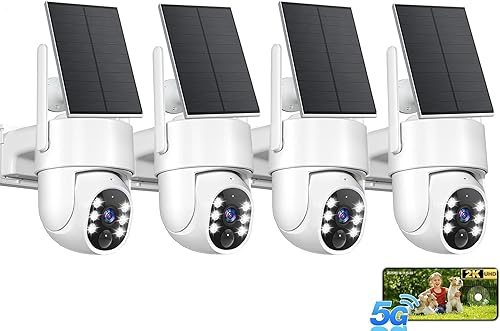
Gianteye 2K Security Camera System
9.3/10 our score
See it on Amazon
- 4
 Best for a finished basementCheck it
- 5
 Check it
CAMCAMP Wireless Security Camera System 8 Security Cameras Wireless Outdoor
Best for a large basement or cellar - 6
 Check it
Rraycom 5G/2.4G Security Cameras Wireless Outdoor
Best for fast alerts on a dual-band router - 7
 Check it
Hapippofa Wireless Alarm System for Home Security
Best for wide basement coverage - 8
 Check it
VTimes Smart Home Security Camera System Wireless
Best for basements without Wi-Fi - 9
 Check it
firstrend Wireless Security Camera System with 500GHDD
Best budget recorder kit
The best wireless systems for basement coverage
The tolviviov kit wins on entry coverage and no-fee operation. Every other pick is here because it solves one basement problem better: weak signal, no Wi-Fi at all, a large cellar, or a finished room where you would rather not drill.
tolviviov 15-Piece WiFi Home Security System: Best for most basements
- Ten door/window sensors and one motion sensor
- 120 dB siren
- Expands to 20 sensors and 5 remotes or keypads
- Works with Alexa on 2.4GHz Wi-Fi only
Ten contact sensors cover a stair door and a row of small basement windows. The kit runs without monthly fees and adds sensors later.
Pros
- Tied for the most door and window sensors here
- No subscription
- Keypad plus two remotes
Cons
- 2.4GHz Wi-Fi only
- One motion sensor
This kit suits a typical basement with one stair door and several small windows. It ships with ten contact sensors and one motion detector, so you can arm the stair door, the bulkhead and each window without buying extras.
The 120 dB siren sits in the base station. Put the station near the top of the stairs on the basement side of the wall and the alarm is loud on both floors.
Sensors run on alkaline batteries and talk to the base over 2.4GHz Wi-Fi. The system pairs with Alexa and expands to 20 sensors and five remotes or keypads.
That headroom matters in a basement, where one window often gets missed on the first count. The main limit is its single motion sensor.
A long, open basement needs more than one, so plan to add them. The kit works only on 2.4GHz Wi-Fi, so a 5GHz-only router needs a change first.
PGST Home Security Systems 12-Piece Kit: Best for weak basement Wi-Fi
- Wi-Fi plus 4G backup
- Four door/window sensors and two motion detectors
- 110 dB siren
- Alexa and Smart Life or Tuya control
The base station switches to a 4G SIM when Wi-Fi drops, so alerts still reach your phone from a basement dead zone.
Pros
- 4G fallback keeps alerts coming
- Two motion detectors
- Keypad and two remotes
Cons
- Only four contact sensors
- SIM card sold separately
PGST is the pick when the basement kills your Wi-Fi. The base station runs on 2.4GHz Wi-Fi and switches to a 4G network when the router drops, so phone alerts keep coming from a dead zone.
It has fewer contact sensors than the tolviviov kit: four door and window sensors plus two motion detectors. That fits a basement with a stair door, a bulkhead and one or two windows, with the motions covering the open floor.
The keypad sets stay, away and emergency modes at the top of the stairs. A 110 dB siren and Alexa voice control round it out.
The trade-off is the 4G backup, which needs a SIM card you supply. Coverage of every small basement window costs extra sensors.
For a weak-signal basement, though, no other kit here keeps alerts flowing so reliably.
Gianteye 2K Security Camera System: Best for watching the basement stairs
- Four solar and battery cameras
- 2K color night vision with spotlight
- AI human detection
- 2.4GHz and 5GHz Wi-Fi
Point one camera down the basement stairs and keep the rest on the main floor. Human detection cuts alerts from pipes, pets and moving boxes.
Pros
- Dual-band Wi-Fi
- Solar panels reduce charging trips
- Two-way talk
Cons
- Cameras need sunlight for daily charging
- No contact sensors in the box
Gianteye works as an addition to an entry kit, not a replacement. The four cameras are solar and battery powered, so you can mount one at the top of the basement stairs and aim another across the room without fishing for an outlet.
The 2K sensor with color night vision and a spotlight shows faces and stored boxes clearly in a dark basement. AI human detection filters out the furnace kicking on or a cat crossing the floor.
Two-way audio lets you answer someone at the basement door from your phone.
Dual-band Wi-Fi means the cameras can use a 5GHz band when the router supports it. The catch is sunlight: the panels need about 2 hours a day, so a basement camera has to earn that charge from a window or a brighter spot.
Pair Gianteye with a contact-sensor kit for real window alarms.
GMK 4 Pack Cameras System: Best for a finished basement
- Four 2K cameras with 110-degree view
- Rechargeable battery with 1-6 months standby
- Color night vision and siren
- 2.4GHz Wi-Fi only
The cameras stand on a flat surface without drilling, which suits a rented or freshly finished basement. Battery power skips outlets near the ceiling.
Pros
- No-drill indoor option
- Siren and flashing light
- Family sharing in the app
Cons
- 2.4GHz Wi-Fi only
- Battery needs periodic recharging
GMK suits a finished basement you would rather not drill. Each 2K camera has a flat base and stands upright on a shelf or cabinet, so you can cover a rec room, a home office corner or the stair landing without screws.
The 110-degree view is wide enough to watch a doorway and the space beside it. Color night vision shows detail in a dim room, and the siren plus flashing light give you a way to push back at an intruder.
Battery life runs 1 to 6 months of standby, with up to 3,000 motion triggers on one charge. Expect more charging in a busy basement than in a spare room.
It supports 2.4GHz Wi-Fi only. For a room with one entry and no wiring, it is the easiest camera kit to place here.
CAMCAMP Wireless Security Camera System 8 Security Cameras Wireless Outdoor: Best for a large basement or cellar
- Eight plug-in cameras with a 16-channel NVR
- 500GB hard drive pre-installed
- Pan and tilt with auto tracking
- Records without internet
One recorder holds footage from eight cameras on a 500GB drive and works without home internet. That fits a big cellar or a basement split into rooms.
Pros
- Local recording with no monthly fee
- Room to add eight more cameras
- Auto tracking follows movement
Cons
- Every camera needs an outlet
- Remote viewing needs Wi-Fi
CAMCAMP is the one to pick for a large cellar or a basement split into several rooms. Eight cameras on a 16-channel recorder cover a long space, and the 500GB drive holds continuous footage without a cloud fee.
The pan and tilt cameras rotate 355 degrees and follow movement, which helps in a basement where one camera cannot see around support posts. The system records and stores video without home internet, so you can review footage on a TV during an internet outage with mains power intact.
The trade-off is power. Every camera needs an outlet, so count your basement sockets before buying.
Remote viewing needs Wi-Fi, but local recording does not. For a big unfinished space with plenty of plugs, it covers more ground than any camera kit here.
Rraycom 5G/2.4G Security Cameras Wireless Outdoor: Best for fast alerts on a dual-band router
- Four 2K cameras
- 2.4GHz and 5GHz Wi-Fi
- 110 dB siren with spotlight
- Alexa voice control
Rraycom says its dual-band cameras send alerts faster than 2.4GHz-only models. Pair it with a modern router that reaches the basement.
Pros
- 5GHz support for faster streaming
- Wide 130-degree view
- Bluetooth pairing
Cons
- No contact sensors
- Bird recognition needs a subscription
Rraycom fits a basement on a modern dual-band router. The four 2K cameras pair over Bluetooth and stream on 5GHz when the signal reaches, which Rraycom says gets alerts to your phone 1 to 2 seconds faster than 2.4GHz-only cameras.
The 130-degree view covers more of a wide basement room per camera. A 110 dB siren and spotlight fire when motion is detected, and you can draw safety zones in the app so a passing cat or a swaying curtain stays quiet.
Two-way audio and Alexa viewing round it out. The 5GHz speed only helps if the router reaches the basement, so test the signal before mounting.
Like the other camera picks, it has no contact sensors, so pair it with an entry kit for window alarms.
Hapippofa Wireless Alarm System for Home Security: Best for wide basement coverage
- 10 contact sensors and five motion detectors
- Wi-Fi plus 4G backup
- 120 dB siren
- 48-hour battery backup
Five motion detectors cover a long basement run where contact sensors cannot reach. The hub keeps working through a power cut.
Pros
- Most motion detectors here
- Anti-tamper hub design
- Works with Alexa and Tuya
Cons
- SIM card sold separately
- Hub needs a wall mount
Hapippofa covers a long basement better than any kit here. Five motion detectors with a 110-degree view and a 12-meter range can watch an open floor that contact sensors cannot reach, while ten contact sensors handle the stair door and windows.
The hub backs up to 4G when Wi-Fi fails and runs up to 48 hours on its internal battery during a power cut. A 120 dB siren sounds at the panel, and the anti-tamper mount triggers an alarm if someone pries the hub off the wall.
The setup needs drilling for the hub, so it suits a permanent installation more than a rental. A SIM card for the 4G backup is sold separately.
For a wide, finished basement with a real risk of signal loss, this kit covers the most ground.
VTimes Smart Home Security Camera System Wireless: Best for basements without Wi-Fi
- Four cameras with a 10.1-inch monitor
- 1000 ft FHSS link, no Wi-Fi needed
- AI human detection
- IPX6 water resistance
The monitor pairs directly with the cameras, so a basement with no signal still gets live video. A phone app takes over when you are away.
Pros
- Works with no Wi-Fi at all
- Large monitor for live viewing
- Human detection filters alerts
Cons
- Cameras still need power cords
- Phone viewing needs Wi-Fi
VTimes solves the basement with no Wi-Fi at all. The four cameras pair straight to a 10.1-inch monitor over a 1000 ft frequency-hopping link, so live video works without a router or internet.
The monitor runs on a 5000mAh battery, so you can carry it down the stairs while you set up. AI human detection filters alerts, and IPX6 water resistance covers a damp basement corner.
The app takes over for remote viewing when Wi-Fi is available.
The catch is power: the cameras need cords, and the phone app only works when the monitor is on and connected to Wi-Fi. For a cellar, garage or outbuilding with no signal, it is the only pick here that shows live video without a network.
firstrend Wireless Security Camera System with 500GHDD: Best budget recorder kit
- Four 1080p cameras with an 8-channel NVR
- 500GB hard drive included
- AI human detection
- IP66 weatherproof
A low-cost way to keep continuous basement footage on a local drive. Remote viewing needs the NVR wired to your router.
Pros
- Continuous local recording
- No monthly fee
- Room for four more cameras
Cons
- 1080p only
- NVR needs an Ethernet cable to the router
firstrend is the budget way to keep continuous basement footage on a local drive. Four 1080p cameras feed an 8-channel recorder with a 500GB hard drive already inside, so there is no cloud fee and no card to buy.
The cameras are IP66 weatherproof and work indoors too, so a damp basement corner is fine. AI human detection sends app alerts with snapshots, and two-way audio lets you talk to anyone who comes down the stairs.
Resolution tops out at 1080p, below the 2K cameras here, so fine detail is softer. The recorder needs an Ethernet cable to the router for remote viewing.
For a cheap, always-recording setup in a small basement, it does the basic job.
How these systems were compared
Our score weighs specs, features and buyer feedback against what you're shopping for. For a basement, we weighted three things above the rest: whether the kit sends alerts when Wi-Fi drops, how many contact sensors it includes for small windows, and whether recording needs a subscription.
The highest scores went to kits that cover a stair door and several windows out of the box without a monthly fee. Camera kits scored slightly lower as basement alarms because they detect motion but not an opened window.
We also checked power: battery and solar cameras avoid outlet hunting, while plug-in cameras need sockets in a room that may have few.
Do you need contact sensors or cameras for a basement?
Both, if the basement has windows you can reach. A camera shows you what happened, but only a contact sensor tells you a window or stair door has opened.
Buy an entry kit as the base and add cameras for eyes on the room.
A camera-only kit suits a finished basement used as a rec room or office, where the main worry is someone walking in. An entry kit suits a basement with ground-level windows, a bulkhead or a door to the outside.
If you have both, buy one of each and set the camera to watch the stairwell.
Check your window count first. A row of four small basement windows eats most of the sensors in a 12-piece kit.
The tolviviov kit's ten contact sensors fit that layout better than kits with four or five.
Which basement alarm still works when Wi-Fi drops?
The PGST 12-Piece Kit and the Hapippofa kit, because both base stations fall back to a 4G network when the router loses its connection. That matters in a basement, where the signal is often the first to go.
A Wi-Fi-only kit goes quiet when the router reboots or the internet fails. The 4G fallback keeps phone alerts coming, but you supply the SIM card and its data plan.
The PGST kit switches automatically; the Hapippofa hub also runs 48 hours on battery during a power cut.
If your basement Wi-Fi is solid, a Wi-Fi-only kit is fine and costs less to run. If the signal dies at the bottom step, pay for the cellular backup.
Test your signal first by standing at the base station spot with your phone.
What if the basement has no Wi-Fi at all?
The VTimes system pairs its cameras to a monitor over a 1000 ft link, so live viewing works with no router. The CAMCAMP kit also records without internet, and you watch playback on a TV.
Both still need power at each camera.
How many sensors does a basement need?
Count your entry points first, then add one motion sensor per open room. A typical basement has a stair door, a bulkhead and two to four small windows.
That is four to six contact sensors before you think about the floor.
The tolviviov kit includes ten contact sensors and one motion sensor. The Hapippofa kit includes ten contact sensors and five motion sensors for a long open space.
The PGST kit starts smaller at four contact and two motion sensors but expands.
For a wide basement with support posts and alcoves, motion coverage matters as much as door coverage. One sensor cannot see around a corner.
Place them in opposite corners and aim them across the room, not down the stairs.
Do basement cameras work through concrete?
Often, at short range, but a thick poured wall can block the 2.4GHz signal. Put the base station or hub on the basement side of the wall, and keep it within 100 feet of the farthest sensor.
Battery sensors send a weaker signal than a camera streaming video. A base station mounted just above the basement door on the inside wall usually reaches the whole room.
If it does not, the PGST or Hapippofa 4G backup keeps alerts flowing.
Cameras that use 5GHz need a router close enough to reach. Rraycom and Gianteye both support the faster band, which helps when the router sits one floor up.
A weak signal shows up as laggy video, not as a missed alert.
What about a metal bulkhead or a steel door?
Metal blocks wireless signals more than concrete. Mount the sensor on the frame inside the basement, not on the outer metal face.
The contact pair only needs the frame and the moving part to line up when the door closes.
How should you place sensors in a basement?
Start at the top of the stairs and work down. Put a contact sensor on the stair door so the system arms before anyone reaches the basement floor.
Then cover each ground-level window and the bulkhead.
Mount motion sensors 6 to 8 feet high in a corner. Aim them across the floor rather than at the stairwell, or you will trip the alarm every time someone walks past the door upstairs.
Keep the siren or base station central and within Wi-Fi range. In a basement that floods, mount the base station above the high-water mark.
Battery sensors on windows sit above any damp sill, which helps them last.
Our guide to door alarms for home covers the stair door setup in more detail. For an outside approach, the driveway alarms picks watch the path to the basement entrance.
If you want one app for everything, the abode security system works as a whole-home base. And when the basement opens onto a patio, the wireless security systems for backyard picks cover the outside face.
Which kit suits a rental basement?
A no-drill camera kit such as the GMK 4 Pack, because the cameras stand on a flat surface without screws. The adhesive strips on most contact sensors also peel off cleanly, so you can take the system with you.
Renters often cannot drill for a hub or a siren. The tolviviov base station and its sensors mount with adhesive strips or hardware.
The GMK cameras sit upright on a shelf. The Hapippofa hub needs wall screws, so it suits an owner more than a tenant.
Check your lease before adding anything to a window frame. Adhesive pads are the safer choice, and keep the original strips so the frame cleans up easily when you move.
Verdict
Buy the tolviviov 15-Piece kit if your basement has a stair door and several small windows, since its ten contact sensors cover those entries and it runs without a subscription. Pick the PGST 12-Piece Kit when the basement Wi-Fi is weak and you want 4G backup on alerts.
For a large cellar, the CAMCAMP eight-camera kit covers the most ground. A camera kit adds eyes on the room, but a wireless security system for your basement still needs a contact sensor on every window and door.
Our top 3 picks at a glance
-
1
Best for most basements
tolviviov 15-Piece WiFi Home Security System
9.5/10 our score
See it on Amazon -
2
Best for weak basement Wi-Fi
PGST Home Security Systems 12-Piece Kit
9.5/10 our score
See it on Amazon -
3
Best for watching the basement stairs
Gianteye 2K Security Camera System
9.3/10 our score
See it on Amazon
Frequently asked questions
Do wireless basement alarms work through concrete walls?
Often they do at short distances, but a thick poured wall can cut the 2.4GHz signal. Put the base station or hub on the basement side of the wall, near the top of the stairs, so sensors talk to it directly.
Where should I put a motion sensor in a basement?
Mount it in a corner at 6 to 8 feet high, aimed across the room rather than down the stairs. A sensor facing a stairwell often catches people on the floor above and sets off false alarms.
Do basement window sensors need to be on the glass?
No. The contact pair works on the frame and the moving sash, not the pane.
That keeps the sensor working when someone opens the window, and it avoids drilling into glass.
Can I use a camera-only system as a basement alarm?
Yes, for alerts and video, but it will not tell you when a window opens. Add at least one contact sensor on the basement stair door if you want a true entry alarm.
What happens to a wireless basement system in a power cut?
Battery-powered sensors keep sending to a hub running on backup. The Hapippofa hub has a 48-hour backup battery, so alerts continue during an outage.
Camera systems on plug-in power stop recording.