WiFi vs Cellular Home Alarm Systems: Which Is Better? (October 2026)
WiFi alarms use your home internet, while cellular alarms send signals over a mobile network. For a wifi vs cellular alarm system, choose based on coverage, power backup, and which features your plan supports.
On this page (8 sections)
- WiFi vs cellular alarm systems: how do they connect?
- Which connection handles an internet outage better?
- What happens to an alarm during a power outage?
- Does cellular backup require professional monitoring?
- How do you choose a WiFi vs cellular alarm system?
- Which alarm system fits each connection preference?
- What setup and care steps prevent connection problems?
- WiFi vs cellular alarm system: which should you choose?
WiFi alarms use your home internet, while cellular alarms send signals over a mobile network. For a wifi vs cellular alarm system, decide which functions you need during an outage and whether your chosen plan includes another connection path.
WiFi can support app features through your router, but an internet outage may interrupt remote access or alerts. Cellular service can provide a separate route for supported alarm signals, though it still depends on power, mobile coverage, and an active service plan.
Some systems use WiFi as the main connection and cellular as backup. “Wireless” often describes how sensors connect to the base station, so it does not automatically mean the system has cellular service.

WiFi vs cellular alarm systems: how do they connect?
A WiFi alarm connects through your home router, while a cellular alarm uses a mobile network to send signals. These terms describe communication paths, not whether the sensors themselves use wires.
A wireless contact sensor can communicate with its base station over a short-range radio link. The base station then uses WiFi or cellular service to reach an app or monitoring service, depending on the system.
One alarm can use different connections for different jobs. For example, it may use WiFi for app control and cellular for backup monitoring.
It may also rely on WiFi alone. Check the plan and model details for the functions you care about.
How does WiFi work in a home alarm system?
WiFi connects a compatible base station to your router and internet service. Depending on the system and plan, that link can support app access, notifications, or communication with other connected devices.
If the router loses power or broadband service goes down, internet-based features can stop working. A local siren may still sound, but that does not guarantee that an alert will reach your phone or a monitoring center.
How does cellular work in a home alarm system?
Cellular service gives an alarm a path through a mobile network. If home internet is unavailable, a system with cellular service may still communicate, provided it has power, mobile coverage, and an active plan that supports the feature.
Cellular is not a substitute for battery backup. If the base station loses power and has no working battery, it cannot send a signal over any network.
Which connection handles an internet outage better?
Cellular backup can keep supported alarm signals moving when home internet fails. A WiFi-only system may lose remote features until the router and internet connection return.
This difference matters if you expect to be away during an outage. Confirm whether the alarm can still send an alert, whether professional monitoring remains active, and whether cellular service costs extra.
Ring says a compatible Ring Protect Plan can keep Ring Alarm Pro and Ring Alarm online if WiFi goes down. The standard Ring Alarm 8-Piece Kit also requires a compatible plan for its stated online backup feature.
SimpliSafe says its Base Station has built-in network backup during a power outage when a professional monitoring plan is active. Internet loss and power loss are different events, so ask what happens if only the router loses power, only broadband fails, or both go down.
For a system-specific example, read whether SimpliSafe works without WiFi. The answer depends on which functions you expect to keep using.
What happens to an alarm during a power outage?
Neither WiFi nor cellular helps an alarm whose base station has no power. Check the base station’s battery backup and what remains active while it runs on battery.
A power cut can also switch off your router, modem, and separate WiFi equipment. Even when the alarm base station has battery power, internet-based features may stop unless the network equipment has backup power or the alarm can switch to cellular.
A cellular connection removes dependence on the home router for that signal path. The base station still needs power, and the mobile network must be available.
A service plan may also be required.
Read what to expect from home alarm system battery backup to separate the base station’s battery runtime from your network’s backup needs. If you rely on WiFi features during an outage, consider backup power for the router and modem too.
Does cellular backup require professional monitoring?
It depends on the system and plan. Some services include cellular backup only with professional monitoring, while other systems offer different combinations of features.
The phrase “cellular backup” does not guarantee that every alert will reach emergency responders. Confirm whether the plan includes a staffed monitoring center, which events it handles, and whether app notifications work without that plan.
The SimpliSafe 8-Piece Wireless System offers optional professional monitoring, and its stated network backup during a power outage requires an active professional monitoring plan. Ring says a compatible Ring Protect Plan is needed for its stated online backup feature and 24/7 professional monitoring.
If you want phone alerts without paid monitoring, check which app features remain available. Also find out whether the app can reach you through your phone’s cellular data when your home internet is down.
How do you choose a WiFi vs cellular alarm system?
Choose WiFi when your home internet is reliable and the plan supports the features you need. Choose a system with cellular backup when you want a second signal path during internet outages.
Before buying, check these points:
- Does the base station use WiFi, cellular, or both?
- Is cellular backup included, optional, or tied to a monitoring plan?
- What happens to app notifications if broadband fails?
- Does the system have battery backup, and what can it do on battery?
- Is cellular coverage available where the base station will sit?
- Which remote-control and monitoring features require a service plan?
Think about how you use the alarm as well as how it connects. A system is only useful if you can arm it consistently, cover the doors and windows you care about, and understand how to respond to its alerts.
The DIY alarm system guide explains the main parts and setup choices. For installation and sensor placement, follow how to install a home alarm system yourself.
Which alarm system fits each connection preference?
Ring Alarm Pro fits a WiFi-centered setup because it includes an eero Wi-Fi 6 router. The standard Ring kit provides the core Ring Alarm pieces, while the SimpliSafe kit offers optional professional monitoring.
These products do not make a direct WiFi-versus-cellular comparison: their connection features depend on the system and plan. Verify the signal path and outage behavior you need before choosing.
The kit includes a keypad, 4 contact sensors, a motion detector, and a range extender. Ring says its router can cover up to 1,500 square feet, though room layout and building materials affect coverage.
Setup uses both the Ring and eero apps. If you want remote arming, backup connectivity, or professional monitoring, check the compatible Ring Protect Plan requirements first.
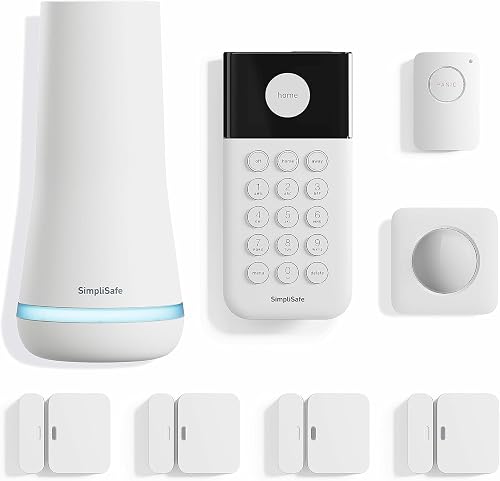
The kit includes a base station, keypad, 4 entry sensors, a motion sensor, and a panic button. Setup starts by plugging in the base station, downloading the app, and placing the sensors.
SimpliSafe sells and supports this system and its monitoring services in the US. If you live elsewhere, confirm availability and support for your location before choosing it.
This kit includes a base station, keypad, 4 contact sensors, a motion detector, and a range extender. Ring says a compatible plan supports remote arming and keeps the system online if WiFi goes down.
Choose it if you want a standard Ring Alarm kit and do not need the built-in eero WiFi 6 router in the Alarm Pro model. Confirm the plan requirements for your location and desired features.
What setup and care steps prevent connection problems?
Check the network, power, and plan before placing sensors or activating monitoring. A base station that cannot connect where it sits may not deliver the features you expect.
Place the base station where it has power and a reliable connection, following the manufacturer’s instructions. If you plan to use cellular backup, check signal availability in that location and learn how the provider recommends confirming the connection.
Install contact sensors on the doors and windows you want to monitor. Then use the app or keypad instructions to confirm that each sensor registers when opened; a door alarm sensor guide can help you plan which entry points to cover.
Keep the base station, router, and modem accessible for routine checks. Review app alerts, replace batteries as directed, and check that your monitoring plan remains active if a feature depends on it.
A common mistake is to assume that a working siren means remote notifications are working too. Check the app and connection status separately, and learn what the system does when internet or power is interrupted.
Another mistake is buying a kit based only on the word “wireless.” Confirm the base station’s connection type, the plan’s backup terms, and the service availability at your address.
WiFi vs cellular alarm system: which should you choose?
Pick WiFi if your internet is dependable and the alarm’s app features fit your needs; pick cellular backup if you want a separate signal path during an internet outage. Either way, confirm battery backup, monitoring terms, and coverage before you buy.
For a WiFi-centered system with a router built in, compare Ring Alarm Pro and check which features require a compatible plan. Choose the standard Ring kit if its included sensors and base station fit your needs without the built-in router.
Consider SimpliSafe if you want app control and optional professional monitoring, and you are comfortable with its stated network backup requiring a monitoring plan. To check whether that plan matches your outage needs, review home alarm battery backup expectations and the Ring Alarm base station guide.
Frequently asked questions
Is WiFi or cellular better for a home alarm?
WiFi can suit a home with reliable internet, while cellular can add a separate path for alarm signals when home internet is unavailable. The better choice depends on the system's connection design, power backup and monitoring plan.
Check what the exact system does during an internet or power outage.
Does a WiFi alarm work when the internet goes out?
A WiFi alarm may still sound locally when the internet is down, but app access, notifications or monitoring can be interrupted unless the system has a backup connection. Check the plan and backup details for your exact model.
Internet loss and power loss are separate problems, so check both.
Does a cellular alarm need WiFi?
A cellular-connected alarm can send signals over a mobile network, so it may not need home WiFi for that path. Some systems still use WiFi for app features, cameras or other connected devices.
Confirm which functions use cellular and which rely on your router before choosing.
Can an alarm use both WiFi and cellular?
Some alarm systems can use home WiFi for their main connection and cellular service as a backup, often through a paid monitoring plan. That combination can help if one connection fails, but it does not guarantee uninterrupted service.
Check the plan terms, power backup and supported network for the system you choose.
Will a power outage stop a cellular alarm?
A cellular connection does not keep an alarm powered during an outage. The base station needs its own battery backup, and any router-dependent functions need power for the router too.
Check how long the system can run on battery and whether cellular backup requires a monitoring plan.


