Ring Alarm Pro 8-Piece Kit Review: Worth It? (October 2026)
This ring alarm pro review finds the 8-Piece Kit suits homes that want a DIY alarm and built-in eero Wi-Fi 6 router together. Remote arming, Wi-Fi backup, professional monitoring, and Alexa voice arming require a compatible Ring Protect Plan.
On this page (9 sections)
- What does the Ring Alarm Pro 8-Piece Kit include?
- What does the built-in eero router add?
- Does Ring Alarm Pro need a subscription?
- How do you set up Ring Alarm Pro?
- Ring Alarm Pro vs Ring Alarm 8-Piece Kit
- What alternatives fit other priorities?
- What mistakes should you avoid when choosing or using it?
- Is Ring Alarm Pro worth choosing?
- Related alarm and sensor guides
This ring alarm pro review finds the 8-Piece Kit is a strong fit when you want an alarm system and an eero Wi-Fi 6 router in the same setup. It covers four entry points and one room or hallway, while remote arming, Wi-Fi backup, and professional monitoring require a compatible Ring Protect Plan.
The key buying question is whether you need the router as well as the alarm. If your Wi-Fi already suits your home, the standard Ring Alarm 8-Piece Kit has the same included sensor count without the built-in router.
Our DIY alarm systems guide explains how to match a kit to your doors, rooms, and monitoring preferences.
What does the Ring Alarm Pro 8-Piece Kit include?
The kit includes an Alarm Pro Base Station, Keypad, four Contact Sensors, one Motion Detector, and one Alarm Range Extender. That is a useful starting point for several exterior entry points plus one interior area.
Ring Alarm Pro 8-Piece Kit: Best for router upgrades

- Built-in eero Wi-Fi 6 router
- 4 contact sensors
- 1 motion detector
- 1 range extender
Combines an alarm system with an eero Wi-Fi 6 router. Remote arming and keeping the system online if Wi-Fi goes down require a compatible Ring Protect Plan.
Pros
- Includes four contact sensors and one motion detector
- Built-in eero Wi-Fi 6 router
- Can expand with additional Ring sensors and eero extenders
Cons
- Some remote and backup features require a paid plan
- Additional sensors and eero extenders are sold separately
The contact sensors are for doors or windows. Ring positions the motion detector for one hallway or room, so plan around the parts included instead of assuming this kit covers every opening and interior space in a larger home.
Write down the doors and windows you want to monitor, then choose a central room or hallway for the motion detector. Our guide to door alarm sensors covers placement choices and how sensor types differ.
Who is Ring Alarm Pro best for?
Ring Alarm Pro suits households that want a DIY alarm and an eero Wi-Fi 6 router in one system. It is especially relevant if you are already planning a router change and want to consider alarm coverage at the same time.
Skip the Pro if your current Wi-Fi works well and you only want a basic Ring alarm kit. In that case, the Ring Alarm Base Station guide can help you understand the central alarm component before comparing kits.
What does the built-in eero router add?
The built-in eero Wi-Fi 6 router is the main reason to choose Alarm Pro over the standard Ring kit. Ring states speeds up to 900 Mbps and coverage up to 1,500 sq ft, with optional online threat protection.
Those figures are capabilities, not a promise of the same speed or coverage in every home. Walls, placement, connected devices, and your internet service can all affect results, so compare the stated coverage with your home's layout.
If your current router already covers the rooms and devices you care about, the extra router may add little value to your alarm decision. If you need a network change, compare the eero setup with your current equipment before choosing the combined kit.
Does Ring Alarm Pro need a subscription?
Remote arming, Wi-Fi backup, and professional monitoring require a compatible Ring Protect Plan sold separately. Ring says its 24/7 professional monitoring can provide emergency police, fire, and medical response.
Alexa voice arming also requires a Ring Protect subscription. If you expect to use remote control or monitoring, check the current plan options and confirm which services fit your needs before buying.
An alarm's internet connection and its response plan are separate considerations. Our Wi-Fi vs cellular alarm systems guide explains what to weigh when your home internet is unavailable.
How do you set up Ring Alarm Pro?
Ring describes setup as plugging in the Pro Base Station, using the Ring and eero apps, and placing the sensors in chosen locations. The kit includes what you need for that installation process.
Before opening the apps, decide which four entry points matter most and which room or hallway should get motion coverage. This avoids placing a sensor where daily door use, furniture, or household traffic makes it less useful.
Use the range extender where it helps the alarm system reach its sensors. If you are unsure whether your layout needs more range, see what a Ring Alarm Range Extender does.
Once setup is complete, keep the sensor map with your household instructions. Review it when you move furniture, change how a room is used, or add more sensors, so everyone knows which areas the system covers.
Ring Alarm Pro vs Ring Alarm 8-Piece Kit
Both Ring kits include four contact sensors, one motion detector, a keypad, and a range extender. Alarm Pro adds the eero Wi-Fi 6 router, while the 2nd Gen kit offers Ring app notifications and device monitoring.
| Feature | Ring Alarm Pro 8-Piece Kit | Ring Alarm 8-Piece Kit (2nd Gen) |
|---|---|---|
| Base station | Alarm Pro Base Station | Base Station |
| Contact sensors | 4 | 4 |
| Motion detector | 1 | 1 |
| Keypad | 1 | 1 |
| Range extender | 1 | 1 |
| Built-in router | eero Wi-Fi 6 | Not included |
| App setup and use | Ring and eero apps | Ring app notifications and device monitoring |
| Remote arming, Wi-Fi backup, and monitoring | Compatible Ring Protect Plan required | Compatible Ring Protect Plan required |
Choose Pro if the router is useful to your home and you want it included with your alarm setup. Choose the 2nd Gen kit if your Wi-Fi is already covered and you want the same core sensor mix.
What alternatives fit other priorities?
Ring Alarm Pro is for shoppers who value an alarm and router together. The other kits here make more sense when you want a panic button, a Ring alarm without a router, or local storage.
Ring Alarm 8-Piece Kit (2nd Gen)
The standard Ring kit suits a shopper who wants Ring alarm coverage but does not need an eero router bundled in. Ring says it sends mobile notifications when the system is triggered and supports monitoring Ring devices through the Ring app.
Ring Alarm 8-Piece Kit (2nd Gen): Best for Ring-only alarms

- 1 base station
- 1 keypad
- 4 contact sensors
- 1 motion detector
- 1 range extender
A Ring alarm kit with the same core sensor count as the Pro kit, without a built-in eero router. It suits shoppers who want alarm coverage through the Ring app.
Pros
- Four contact sensors cover multiple doors or windows
- Ring app notifications when the system is triggered
- Can add more Ring sensors and accessories
Cons
- Does not include a built-in eero router
- Remote arming and Wi-Fi backup depend on a compatible Ring Protect Plan
SimpliSafe 8-Piece Wireless System
SimpliSafe is the clearest alternative if a dedicated panic button matters to you. The kit also has four entry sensors, a motion sensor, a keypad, and a Base Station; its motion sensor is specified for people, not pets.
SimpliSafe 8-Piece Wireless System: Best for emergency buttons
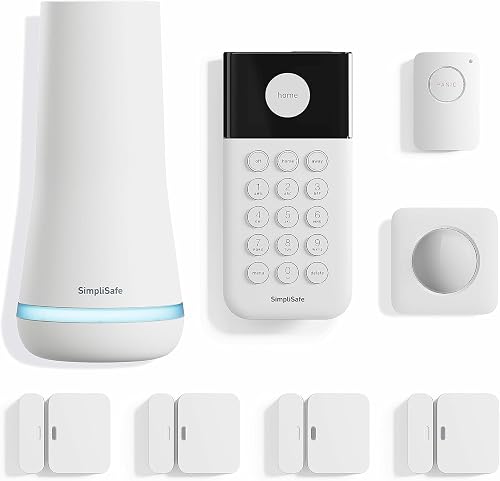
- 4 entry sensors
- 1 motion sensor
- 1 panic button
- Wireless keypad
Adds a panic button to an eight-piece wireless system with four entry sensors. SimpliSafe says professional monitoring is optional and is offered in the US.
Pros
- Includes a dedicated panic button
- Entry sensors can cover doors, windows, and cabinets
- No wiring or drilling required for setup
Cons
- Professional monitoring is required for police dispatch from the panic button
- Products and monitoring are supported only in the US
SimpliSafe says setup does not require wiring or drilling, and professional monitoring is optional. Police dispatch from the panic button requires 24/7 professional monitoring, and the system is sold and supported only in the US.
eufy 7-Piece Essential Alarm System
eufy fits buyers who prioritize local storage and a system described as having no monthly fee. HomeBase Mini includes 64GB of local storage, with a keypad, four entry sensors, and one motion sensor in the kit.
eufy 7-Piece Essential Alarm System: Best for local storage

- HomeBase Mini with 64GB local storage
- 4 entry sensors
- 1 motion sensor
- Keypad
A smaller alarm kit centered on HomeBase Mini with local storage and app alerts. eufy describes the system as having no monthly fee.
Pros
- HomeBase Mini includes 64GB local storage
- Four entry sensors and one motion sensor
- Can add compatible sensors and accessories
Cons
- Seven-piece kit has fewer included components than the Ring kits
- Compatibility varies by eufy camera and doorbell model
The system offers app control and instant alerts, and you can add compatible accessories. Compatibility with existing eufy cameras and doorbells varies by model, so check the current compatibility list if you plan to connect equipment you already own.
What mistakes should you avoid when choosing or using it?
The most common buying mistake is choosing Alarm Pro for the word “Pro” without needing its router. Compare your current Wi-Fi coverage and the plan features you intend to use; if neither changes, the standard Ring kit is the more direct fit.
Another mistake is treating an eight-piece kit as whole-home coverage by default. Its four contact sensors and one motion detector cover a defined set of openings and one interior area, so map your home before deciding whether you will need expansion.
Avoid placing sensors without considering how your household uses each door and room. Pick the entry points you most want alerts for, and set the motion detector where it covers the intended space without facing routine household movement.
Finally, don't assume every feature works the same without a subscription. Confirm plan requirements for remote arming, Wi-Fi backup, professional monitoring, and Alexa voice control before making those features part of your decision.
Is Ring Alarm Pro worth choosing?
Choose Ring Alarm Pro if you want an alarm kit and eero Wi-Fi 6 router together, and the included sensors match your first coverage priorities. Choose the standard Ring kit if you already have suitable Wi-Fi, SimpliSafe if a panic button is central, or eufy if local storage and no monthly fee are your priorities.
For a wider comparison of DIY kits and system types, browse our home alarm kits guide. The right ring alarm pro review takeaway is simple: buy the Pro for the combined router and alarm setup, not just for the Ring sensor kit.
Related alarm and sensor guides
Use these guides to plan your coverage and understand the main system parts:
- DIY alarm systems: what to buy and how they work
- What the Ring Alarm Base Station does
- Do you need a Ring Alarm Range Extender?
- Best window alarm sensors for home security
Frequently asked questions
What comes with the Ring Alarm Pro 8-Piece Kit?
The kit includes one Alarm Pro Base Station, one Keypad, four Contact Sensors, one Motion Detector, and one Alarm Range Extender. Put the contact sensors on the doors or windows you want to monitor, then place the motion detector in a main hallway or room.
Does Ring Alarm Pro include Wi-Fi?
Yes. Ring Alarm Pro has a built-in eero Wi-Fi 6 router with stated coverage up to 1,500 sq ft.
Ring also describes it as a way to create a secure mesh network, though walls, placement, connected devices, and your internet service affect results.
Can Ring Alarm Pro work without a Ring Protect Plan?
Some features require a compatible Ring Protect Plan, sold separately. Ring says a plan is needed to arm the alarm from anywhere, keep the system online if Wi-Fi goes down, and access 24/7 professional monitoring for police, fire, and medical response.
How does Ring Alarm Pro compare with the regular Ring Alarm kit?
Both kits include a base station, keypad, four contact sensors, one motion detector, and one range extender. Ring Alarm Pro adds a built-in eero Wi-Fi 6 router, while the 2nd Gen Ring Alarm kit provides Ring app notifications and device monitoring without that router.


