Can a DIY Alarm System Work Without Monitoring?
Yes. A DIY alarm system without monitoring still sets off its siren and sends alerts to your phone, with no monthly fee. What you give up is the professional response behind those alerts: someone watching the system and calling help when you don't.
On this page (8 sections)
- What does a DIY alarm system without monitoring actually do?
- How do alerts reach you without a monitoring center?
- What are the limits of a no-monitoring alarm?
- Which kit suits a no-fee setup?
- How do you set up a no-monitoring system yourself?
- How do you handle alerts and false alarms?
- What should you add to a no-monitoring system?
- Is a no-monitoring DIY alarm worth it?
Yes. A DIY alarm system without monitoring still sets off its siren and sends alerts to your phone, with no monthly fee.
What you give up is the professional response behind those alerts: someone watching the system and calling help when you don't.
That trade is the whole point of a no-fee setup. You own the hardware, you get the alerts, and you decide what happens next.
This guide covers what a diy alarm system without monitoring actually does, where it falls short and which kits make the most of the no-fee model.
What does a DIY alarm system without monitoring actually do?
It detects an opening or movement, sounds its siren and pushes an alert to your phone. The hardware works the same as a monitored kit; the difference is who receives the signal and what happens after.
Entry sensors sit on doors and windows and trip when the contact breaks. Motion sensors pick up movement in a room.
When either fires, the base station sounds the siren and sends a notification through the app. A keypad or remote lets anyone at home disarm it quickly.
Everything runs locally first. The siren is the on-site deterrent, and the phone alert is your remote signal.
No call center sits in the middle, so the system never dials emergency services on its own. That is the honest limit of the no-fee model, and it is why the siren and the alert speed matter more than anything else in the kit.
How do alerts reach you without a monitoring center?
Alerts reach you through the app over your home network or a mobile data connection. Wi-Fi kits push notifications whenever the base station has internet; kits with 4G send them over a mobile network instead.
A Wi-Fi kit like the tolviviov system needs a working 2.4GHz network. The D1D9 kit needs a SIM card or Wi-Fi to stay connected.
Either way, the phone in your pocket is the alarm's only responder, so keep the app notifications switched on and the phone charged.
If you use an abode security system or another kit that offers a monitored plan, check what changes when you skip it. Some kits keep app alerts and the siren active without a subscription and only sell the call-center response as an add-on.
That is the setup to look for if you want the option later.
How fast do no-monitoring alerts arrive?
Alerts arrive within seconds in normal conditions, since the sensor talks straight to the base station and the base station pushes the notification. Slow home internet or a weak signal is the main delay.
That speed matters more than it sounds. A door sensor that trips while you are at work gives you a chance to check a camera or call a neighbor before anything else happens.
Keep the base station near the router so the push goes out quickly.
What are the limits of a no-monitoring alarm?
The big limit is the human gap: nobody is guaranteed to see the alert and act. An unmonitored system deters and informs, but it cannot dispatch help.
Three gaps stand out. First, alerts land on your phone, and phones get silenced.
Second, a Wi-Fi kit loses its alert path when the network or power drops. Third, a vacant home may have nobody nearby to respond even when the alert is seen.
The siren covers part of this. A loud siren at the door often sends an intruder away before anything is taken.
But a siren alone does not protect a house that sits empty for weeks. For that case, pair the alarm with cameras you can check remotely and a neighbor who can walk over.
Which kit suits a no-fee setup?
Start with the tolviviov 15-Piece kit for broad coverage at no monthly fee, and look at the eufy kit if you want a cleaner app and keypad. Both are built around a one-time purchase.
The tolviviov kit covers a lot of openings for the money. It includes a base station, a keypad, a motion sensor, 10 door sensors and 2 remotes.
The 120dB siren is the loudest of the three kits here, and the base station supports expansion to 20 sensors and 5 remotes or keypads. It works with Alexa and runs on 2.4GHz Wi-Fi only.
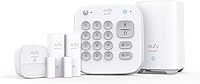
The eufy kit takes a tidier approach. Its HomeBase Mini stores footage locally with 64GB of built-in storage and pairs with selected eufy cameras and doorbells.
The kit includes 4 entry sensors and 1 motion sensor, a keypad and the HomeBase. Eufy says the sensor batteries last up to 5 years, and the keypad recharges over USB.
Which kit is best for a home without reliable Wi-Fi?
The D1D9 24-piece kit is the pick when Wi-Fi is unreliable. It supports 4G and Wi-Fi, so it can send alerts over a mobile network when the home internet is down or missing.
It includes door and window sensors, motion detectors, a remote control and a siren. The peel-and-stick sensors go up without wiring.
D1D9 notes that the kit needs a SIM card or Wi-Fi, and that the included batteries are a gift you replace yourself when they run out. For a rental, a cabin or a home with spotty internet, the 4G path is the reason to choose it.
How do you set up a no-monitoring system yourself?
Mount the base station, place the sensors, pair them in the app and test each zone. The whole job is a couple of hours at most, and none of these kits needs wiring.
Start with the base station near the router and a power outlet. Then fit the entry sensors on the main doors and windows, and place motion sensors where someone would walk after entering.
Avoid pointing a motion sensor at a door or a sunny window, since heat and movement there can set it off.
Pair each device in the app and name it clearly, so an alert tells you "back door" rather than "sensor 4." Then test every zone with the siren turned down.
Finally, set the siren volume and check the app's notification settings on every phone in the house. Our guide to the best alarm keypad covers keypad placement and code choices if you want the disarm step to be quick.
How do you handle alerts and false alarms?
Treat each alert as a real event until you rule it out, and fix the cause of repeat false alarms. Most false trips come from a loose sensor, a drafty door or a pet crossing a motion sensor.
When an alert arrives, open the app and check the zone name. If you have cameras, look at the matching camera before you call anyone.
If the alert is real and you are away, call a neighbor or emergency services yourself; with no monitoring center, that call is yours to make.
Reduce false alarms by re-seating sensors that have shifted, tightening door latches and keeping motion sensors away from pets and heaters. A keypad or remote helps too, because family members can disarm the system without fumbling with the app.
What should you add to a no-monitoring system?
Add cameras for visual confirmation and a keypad or remote for quick disarming. These two additions close most of the gap left by skipping the call center.
Cameras turn an alert into evidence. If you want a kit that includes them, compare options in our guide to the best diy home security system with cameras.
The eufy HomeBase Mini already works with selected eufy cameras, so it is a natural base if you plan to add them.
A keypad or remote matters for the people at home. An alert you see from work is useful, but a family member walking in needs to disarm the system in seconds.
Our diy alarm system guide covers how kits differ on sensors, hubs and expansion if you are still choosing.
Is a no-monitoring DIY alarm worth it?
For most renters and homeowners who keep their phone nearby, a no-monitoring kit is worth it. You get a siren, phone alerts and a one-time cost instead of a monthly bill.
The no-fee model fits people who are home often, who have a neighbor to call and who want a deterrent without a contract. It fits less well for vacant homes or anyone who wants a guaranteed response.
Pick the tolviviov kit for wide coverage at no monthly fee. Pick the D1D9 kit for 4G alerts in a weak Wi-Fi home.
Pick the eufy kit for local storage and a clean app. Any of the three makes a diy alarm system without monitoring a practical, honest choice when you accept that the response is yours to make.
Frequently asked questions
Does a DIY alarm system without monitoring still call the police?
No. With no monitoring service, nobody watches the alerts for you, so the system cannot dispatch police or a guard.
You receive the alert and decide what to do, whether that means checking a camera, calling a neighbor or phoning emergency services yourself.
Will a no-monitoring alarm still work when the power goes out?
It depends on the kit. Battery-powered sensors keep reporting, but the base station, hub or Wi-Fi router needs backup power to pass alerts on.
Check whether the kit you want has a battery backup before you rely on it during an outage.
What happens if I miss an alert on my phone?
The siren still sounds at home, which is the main deterrent when nobody is watching the app. Beyond that, the alert waits in your app until you see it.
A kit with a keypad or remote lets anyone at home disarm the system without opening the app.
Can I add professional monitoring to a DIY kit later?
Some kits support it and some do not. The eufy system here is sold as a no-fee setup, and the tolviviov kit is built around no subscription.
If you think you may want a monitored plan later, ask about that option before you buy.
Do I need internet for a no-monitoring alarm to send alerts?
A Wi-Fi kit needs a working home network to push alerts to your phone. A kit with 4G connectivity, like the D1D9, can stay connected through a mobile network.
Either way, the siren works locally without the cloud.
Is a no-monitoring system enough for a house that sits empty for weeks?
It is weaker for long absences. An unmonitored system relies on someone noticing an alert and acting on it.
For a vacant home, look for a kit with a mobile-network path, cameras you can check remotely and a trusted neighbor who can respond.