9 Best Alarm Keypads and Key Fobs for DIY Systems (October 2026)
The best alarm keypads and key fobs include the Ring Alarm Keypad (2nd Gen) for simple Ring control, the SimpliSafe KeyFob for remote SimpliSafe access, and the eufy Keypad E10 for multiple access modes.
On this page (6 sections)
The Ring Alarm Keypad (2nd Gen) is the best alarm keypad for most Ring Alarm users because it arms and disarms the system. A matching key fob may suit you better if you want controls you can carry.
Keypads give you a fixed place to control an alarm, while fobs put a few controls within reach on a key ring or in a pocket. The right choice depends on your alarm brand, the accessory’s required hub and how you want to access the controls.
If you're still choosing a system, start with our guide to DIY alarm systems. For other accessories that warn you inside the home, see our best alarm sirens roundup.
Our picks at a glance
-
1

-
2
-
3

How we chose alarm keypads and key fobs
The best alarm keypad for you is one that works with your alarm system and offers the access features you need. We compared each option’s controls, compatibility requirements and placement details.
A compatible accessory matters more than a longer feature list. We gave the highest score to a straightforward way to control a system, then considered portable access, individual codes, emergency controls and hub requirements.
Our score weighs specs and features against what you’re shopping for.
| Product | Best for | Control | Emergency feature | Compatibility | Our score |
|---|---|---|---|---|---|
| Ring Alarm Keypad (2nd Gen) | simple Ring control | Ring Alarm arming and disarming | Response button features require a compatible Ring Home subscription | 8.9 | |
| SimpliSafe KeyFob | remote SimpliSafe access | Remote button control | SimpliSafe Gen 3 | 8.2 | |
| eufy Keypad E10 | multiple access modes | Four modes, duress code and SOS | 7.9 | ||
| abode Keypad 2 | named user codes | 7.7 | |||
| Wyze Wireless Keypad | Wyze system entry | Wyze Home Security System Core Kit | 7.5 | ||
| eufy Key Fob E10 | portable eufy controls | HomeBase Mini, 2, 3 or Pro with required software versions | 7.3 | ||
| abode Key Fob | shared abode access | One-touch arm and disarm | Abode security systems | 7.0 | |
| Arlo Wire-Free Keypad | Arlo room-to-room access | Arlo Home Security System | 6.9 | ||
| Honeywell Ademco 6150 Keypad | fixed English display | 6.8 |
The best alarm keypads and key fobs
These alarm keypads and fobs serve different systems, so first match the accessory to your alarm brand. The picks below are ordered by score, with a specific use for each one.
Ring Alarm Keypad (2nd Gen): Best for simple Ring control
- Arms and disarms Ring Alarm
- Emergency response button features with compatible Ring Home subscription
A keypad for households using Ring Alarm who want another way to arm and disarm the system.
Pros
- Made for Ring Alarm control
- Has emergency response button features with a compatible subscription
Cons
- Emergency response features require a separate compatible subscription
The Ring Alarm Keypad (2nd Gen) is a simple choice for a home already using Ring Alarm. It gives you a keypad location for arming and disarming, which can be more convenient than reaching for a phone.
Ring includes emergency response button features. Those features require a compatible Ring Home subscription, sold separately, so account for that requirement if emergency control is a reason you’re considering this model.
A fixed keypad can help household members follow a consistent entry routine. Choose a location where the person entering can reach the controls, but avoid displaying any access code where a visitor could read it.
This is a clear fit when Ring Alarm is already your system and you want another physical control point. If you're comparing the system itself, our Ring Alarm base station guide explains what the central unit does.
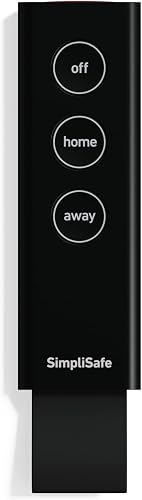
SimpliSafe KeyFob: Best for remote SimpliSafe access
- Remotely arms and disarms
- Built-in panic button
- Compatible with SimpliSafe Gen 3
A remote option for SimpliSafe Gen 3 households that want arming, disarming and a panic button.
Pros
- Remote arm and disarm controls
- Built-in panic button
- Comes with pre-installed batteries
Cons
- Works with SimpliSafe Gen 3 systems
The SimpliSafe KeyFob gives Gen 3 system users remote arm and disarm buttons. Its built-in panic button alerts emergency monitoring that you need help fast.
Setup is done by adding the device with the SimpliSafe keypad, and the fob comes with its batteries pre-installed. Optional installation tools include 2 screws and a mounting plate, though you can carry the fob instead.
This is a better fit for someone who wants a portable remote than for a person who needs a wall keypad with multiple user codes. Confirm that your system is Gen 3 before choosing it.
For a closer look at the brand’s control options, read Do You Need a SimpliSafe Keypad or Key Fob?. Choose this fob if remote button access and a panic button are the priority.
eufy Keypad E10: Best for multiple access modes
- Four arming and disarming modes
- Duress code feature
- One-touch SOS button
- Requires a compatible HomeBase
A keypad for eufy households that want several control modes and an SOS button at the entry point.
Pros
- Four arming and disarming modes
- Duress code and SOS features
Cons
- Requires a compatible HomeBase
The eufy Keypad E10 offers four modes for arming and disarming, plus a duress code feature and a one-touch SOS button. It requires HomeBase Professional, HomeBase 2 or HomeBase 3, so check which model you own.
The keypad offers a control point at home. Its duress feature is designed to silently trigger an emergency dispatch when a preset code is entered under coercion.
The SOS button can trigger an alarm and quickly call for help when you press and hold it for 2 seconds. Confirm how your monitoring setup handles emergency dispatch before relying on these features.
abode Keypad 2: Best for named user codes

- Supports 40 unique PIN codes
- Backlit buttons
- Motion detection
- Requires hub
A keypad for abode users who want individual PIN codes and system status visible at a glance.
Pros
- Assign names to up to 40 codes
- Backlit buttons
- Magnetic wall mount
Cons
- Requires an abode hub
The abode Keypad 2 supports up to 40 unique PIN codes, and you can assign names to codes to see who armed or disarmed the system.
Backlit buttons make the keypad easier to use in low light. It also detects motion and displays system status when someone walks by, and it can act as a motion sensor when the system is armed in Away mode.
This keypad requires an abode hub. Its rechargeable battery and magnetic wall mount can give you more placement choice, but the hub requirement should guide your decision first.
Choose it if individual codes and at-a-glance system status fit your household routine. For another layer of indoor detection, compare it with our best motion sensor alarms.
Wyze Wireless Keypad: Best for Wyze system entry

- Arms and disarms Wyze Home Security System
- On-device emergency button
- Motion-activated backlit keys
A wireless keypad for Wyze Core Kit owners who want a system control point inside the home.
Pros
- Motion-activated backlit keys
- On-device emergency button
- Wireless
Cons
- Requires Wyze Home Security System Core Kit
The Wyze Wireless Keypad requires the Wyze Home Security System Core Kit and does not work as a standalone device. It gives you a place to arm or disarm the system and includes an on-device emergency button.
The motion-activated backlit keys turn on as you approach. Wyze gives a 500 ft range, though placement may depend on your home’s layout and obstructions.
This is a practical choice if your alarm is already based on the Wyze Core Kit. It does not work with a different alarm system.
eufy Key Fob E10: Best for portable eufy controls

- Home, Away, Disarm and SOS modes
- Weather-resistant design
- Requires compatible HomeBase
A carryable eufy remote with four control modes and a fob that can attach to a keychain or lanyard.
Pros
- Four control modes
- Attaches to a keychain or lanyard
- IP65-rated dust and water protection
Cons
- Requires a compatible, updated HomeBase
The eufy Key Fob E10 has Home, Away, Disarm and SOS modes. It can attach to a keychain or be worn with a lanyard, so you can carry it around the home.
This fob requires a compatible eufy HomeBase, including Mini, 2, 3 or Pro models with required software versions. It needs to stay connected to HomeBase and is for use at home.
Its IP65-rated dust and water protection may suit a key fob exposed to damp or dusty conditions at home. Choose it if you want portable controls and have a compatible, updated HomeBase.
abode Key Fob: Best for shared abode access

- One-touch remote arm and disarm
- Works with abode security systems
- Up to 100 ft stated range
A remote for abode users who want family members or temporary guests to operate the system.
Pros
- Works with any abode security system
- Can track who armed and disarmed
Cons
- Single-button design offers fewer controls than a keypad
The abode Key Fob offers one-touch remote arming and disarming and works with abode security systems. abode gives a range of up to 100 ft for this remote.
The fob can be carried on a key ring or in a pocket. The system can track who armed or disarmed it, which may help when different family members or temporary guests have access.
This model has one button, so it offers fewer control choices than a keypad or a multi-mode fob. Consider it when simple remote access is your main need and your alarm is an abode system.
Arlo Wire-Free Keypad: Best for Arlo room-to-room access

- Wire-free keypad
- Integrated siren
- Emergency response buttons
An Arlo system keypad for households that want a control point in another room, with an integrated siren.
Pros
- Can be mounted or placed on a surface
- Integrated siren
- Magnetic mount
Cons
- Emergency response requires an Arlo Secure plan after the trial period
The Arlo Wire-Free Keypad adds an Arlo Home Security System control point that you can mount or place on a surface. It includes an integrated siren that the Arlo system or app can trigger automatically or manually.
A magnetic mount lets you move the keypad around the home or reach it for battery changes. Emergency response buttons are included, and emergency response requires an Arlo Secure plan after the trial period.
This is a system-specific option for Arlo households that want access in another room. Choose it if a movable keypad and integrated siren fit your layout.
Honeywell Ademco 6150 Keypad: Best for fixed English display

- Fixed English display
A fixed-display keypad to consider when your alarm setup calls for the Honeywell Ademco 6150 model.
Pros
- Fixed English display
Cons
- Confirm compatibility with your alarm system before buying
The Honeywell Ademco 6150 Keypad has a fixed English display and is model 6150. Confirm that it is compatible with your alarm panel before buying.
This model makes sense when your existing alarm setup calls for that exact keypad. Compatibility should guide your decision.
How do you choose between an alarm keypad and a key fob?
Choose a keypad if you want a fixed control point with visible buttons or individual access codes. Choose a key fob if carrying a remote and using a small set of buttons fits your daily routine better.
A keypad can serve an entry, hallway or bedroom where you often arm the system. A fob may be easier to pass to a household member, but check whether it supports the controls you need, such as SOS or panic.
Think about the household’s access habits. If several people use different codes, the abode Keypad 2’s named PINs are relevant; if you mostly want to arm or disarm while carrying keys, the SimpliSafe or abode fobs may be a closer match.
Which compatibility checks matter before you buy?
Check the alarm brand and exact system generation before choosing an alarm keypad or key fob. Some accessories require a hub or a starter kit, and a matching brand name alone may not confirm compatibility.
For example, the SimpliSafe KeyFob works with SimpliSafe Gen 3, the Wyze Wireless Keypad requires the Wyze Core Kit, and the eufy Keypad E10 requires a compatible HomeBase. The eufy Key Fob E10 also has HomeBase model and software version requirements.
If a keypad is for an existing wired panel, compare the model number with the panel manual or ask the alarm provider to confirm it. This check matters for the Honeywell Ademco 6150 because its data identifies the model but not compatible panels.
Where should you place an alarm keypad?
Place a fixed keypad where household members can reach it when they enter or leave. A location near a commonly used door can make arming and disarming part of the normal routine.
Keep personal codes private and avoid putting a keypad in a spot that exposes the buttons to someone outside. If you use a fob, keep it accessible to the person who needs it while limiting access for people who should not control the alarm.
Follow the accessory’s setup instructions for wall mounting, pairing and emergency features. Our alarm siren guide can help you compare audible alerts if you’re planning more than one alarm accessory.
Which alarm keypad or key fob should you choose?
Choose the Ring Alarm Keypad (2nd Gen) if you use Ring and want straightforward system control at home. Pick the SimpliSafe KeyFob or abode Key Fob for portable arm and disarm controls, or consider eufy and abode keypads if you need more access modes or named codes.
Before buying, confirm the system, hub and subscription requirements that apply to the accessory. If you’re still setting up your system, our guide to installing a home alarm system yourself covers placement and setup planning.
Our top 3 picks at a glance
-
1
-
2
-
3
Frequently asked questions
Do alarm keypads work with any DIY alarm system?
No. Alarm keypads are usually made for a specific system or hub, so check compatibility before buying.
For example, the Wyze Wireless Keypad requires the Wyze Home Security System Core Kit, while the eufy Keypad E10 requires a compatible HomeBase.
Match the keypad to your system model first.
Is a key fob or keypad better for a DIY alarm?
A keypad is useful as a fixed control point by an entry or inside a bedroom. A key fob gives you remote button control that you can carry, but it may have fewer controls than a keypad.
Choose based on where you want to operate the alarm and how your system supports accessories.
Can an alarm keypad replace the base station?
Usually, no. Several keypads here require a compatible hub or alarm system, and the keypad operates as a control accessory.
The eufy Keypad E10, for example, requires a HomeBase.
Check your system’s setup guide to see which component connects sensors and manages alerts.
Where should you put an alarm keypad?
Place a keypad where you can reach it when entering or leaving, such as near a commonly used door. Keep it accessible without making it easy for a visitor to see or use a personal code.
For installation planning, see our guide to installing a home alarm system.


